Sharp MX-C300PL Especificações Página 92: Colour Adjust
 1
 2
 3
 4
 5
 6
 7
 8
 9
 10
 11
 12
 13
 14
 15
 16
 17
 18
 19
 20
 21
 22
 23
 24
 25
 26
 27
 28
 29
 30
 31
 32
 33
 34
 35
 36
 37
 38
 39
 40
 41
 42
 43
 44
 45
 46
 47
 48
 49
 50
 51
 52
 53
 54
 55
 56
 57
 58
 59
 60
 61
 62
 63
 64
 65
 66
 67
 68
 69
 70
 71
 72
 73
 74
 75
 76
 77
 78
 79
 80
 81
 82
 83
 84
 85
 86
 87
 88
 89
 90
 91
 92
 93
 94
 95
 96
 97
 98
 99
 100
 101
 102
 103
 104
 105
 106
 107
 108
92
SYSTEM SETTINGS
Disable Auto Key Repeat
This setting is used to stop a setting from changing
continuously when the [
] or [
] key is held down,
such as selecting a menu item (auto key repeat will not
operate). When this setting is enabled, a key must be
pressed repeatedly instead of holding it down.
Auto key repeat is initially set to operate (factory
default setting).
Disable Paper Size Set
This setting is used to disable "Paper Size Set" in the
special functions menu. When disabled, "Paper Size
Set" cannot be used when the [Special Function] key
(
) is pressed, which prevents users other than the
administrator from easily changing the paper size
setting.
"Disable Paper Size Set" is initially disabled (factory
default setting).
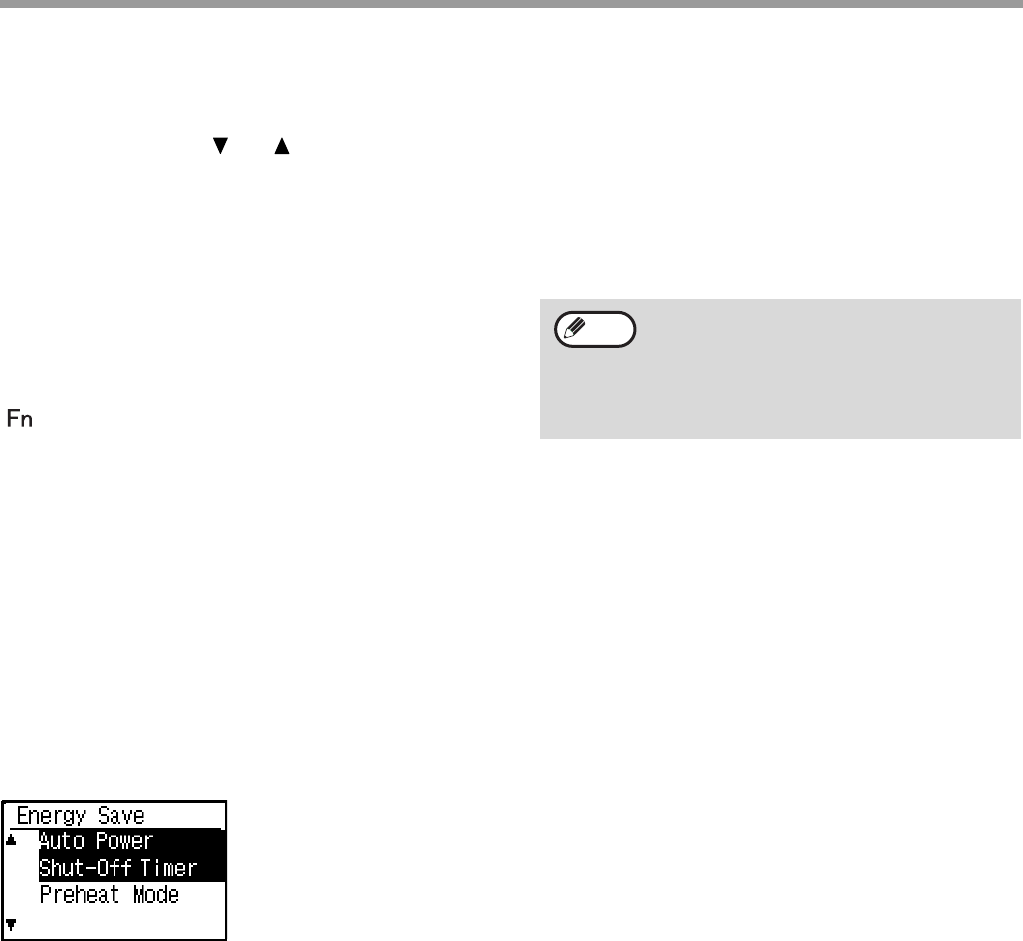
Energy Save
These settings are used to configure energy saving
settings. To access one of these settings, select
"Energy Save" in the mode selection screen, and
select the desired setting in the energy save screen,
and then press the [OK] key.
Auto Power Shut-Off Timer
This setting is used to set the duration of time until
auto power shut-off mode activates when the
operation panel is not used. Using this function helps
conserve energy, preserve natural resources, and
reduce environmental pollution.
"1 min.", "3 min.", "5 min.", "10 min.", "15 min.", "30 min.",
"45 min." or "60 min." can be selected for the duration of
time. Select a setting that suits your work conditions.
Preheat Mode
This setting is used to set the duration of time until
preheat mode, which automatically lowers the fusing
unit temperature, activates when the operation panel is
not used. Using this function helps conserve energy,
preserve natural resources, and reduce environmental
pollution. "1 min.", "3 min.", "5 min.", "10 min.",
"15 min.", "30 min.", "45 min." or "60 min." can be
selected for the duration of time. Select a setting that
suits your work conditions.
Enter Auto Power Shut-Off after the
Remote Job
When the machine completes a print job received from
the PC, the machine immediately returns to the Auto
Power Shut-Off mode.
Toner Save Mode
You can reduce the amount of toner used for printing.
List Print
This is used to print lists and reports that are only for
use by the administrator of the machine.
Select the [List Print] to configure the settings.
• User Info. Print
The user name, user number, paper used, paper
limits, and function permission settings can be
printed for each user.
Colour Adjust.
This machine provides the colour adjustment ways as
shown below.
Easy Calibration and Tone Adjustments
The machine has two colour adjustment functions. Use
the appropriate function depending on the situation.
• Easy Calibration
Use to fit the grey balance. This function implements
a test page print out.
• Tone Adjustments
Use to adjust the tone density of each colour. This
function does not implement a test page print out.
Toner Save Mode is only effective when the
machine's printer driver is not used. When
the printer driver is used, the printer driver
setting takes precedence.
This function may not operate in some
applications and operating systems.
Note
Ficheiro PDF · ·
Perguntas sobre Sharp MX-C300PL
Ainda não há perguntas sobre este manual. Faça a primeira.
Manuais e produtos relacionados com Digitalizar e Imprimir Sharp MX-C300PL
- Digitalizar e Imprimir Sharp MX-M200D Manual do Utilizador
 (100 páginas)
- Digitalizar e Imprimir Sharp AR-4551 Especificações
 (280 páginas)
- Digitalizar e Imprimir Sharp AR-M351N Especificações
(188 páginas)
- Digitalizar e Imprimir Sharp AR-M355 Manual do Utilizador
(12 páginas)
- Digitalizar e Imprimir Sharp MX-M904 Especificações
(122 páginas)
- Digitalizar e Imprimir Sharp JX-9600 Manual do Utilizador
 (14 páginas)
- Digitalizar e Imprimir Sharp CE-140P Manual do Utilizador
 (60 páginas)
- Digitalizar e Imprimir Sharp EL-2607R Especificações

 (2 páginas)
- Digitalizar e Imprimir Sharp DP-750 Manual de Serviço
(110 páginas)
- Digitalizar e Imprimir Sharp AR-M350N/M450N Manual do Utilizador
(12 páginas)
- Digitalizar e Imprimir Sharp ER-01PU Manual de Instruções
(241 páginas)
- Digitalizar e Imprimir Sharp UX-4000M - UX 4000 B/W Laser Printer Guia do Utilizador
(194 páginas)
- Digitalizar e Imprimir Sharp AR-NB3 Manual do Utilizador
(4 páginas)
- Digitalizar e Imprimir Sharp MX-5500N Especificações
(50 páginas)
- Digitalizar e Imprimir Sharp MX-M200D Manual de Serviço
(121 páginas)
- Digitalizar e Imprimir Sharp AR-4551 Manual do Utilizador
(44 páginas)
- Digitalizar e Imprimir Sharp MX-5500N Manual do Utilizador
(6 páginas)
- Digitalizar e Imprimir Sharp AR-RB1 Especificações
(140 páginas)
- Digitalizar e Imprimir Sharp AR-M351N Manual do Utilizador
(20 páginas)
- Digitalizar e Imprimir Sharp FO-2150CM Manual de Serviço
(132 páginas)