Sharp MX-C300PL Especificações Página 79: ROUTINE MAINTENANCE
 1
 2
 3
 4
 5
 6
 7
 8
 9
 10
 11
 12
 13
 14
 15
 16
 17
 18
 19
 20
 21
 22
 23
 24
 25
 26
 27
 28
 29
 30
 31
 32
 33
 34
 35
 36
 37
 38
 39
 40
 41
 42
 43
 44
 45
 46
 47
 48
 49
 50
 51
 52
 53
 54
 55
 56
 57
 58
 59
 60
 61
 62
 63
 64
 65
 66
 67
 68
 69
 70
 71
 72
 73
 74
 75
 76
 77
 78
 79
 80
 81
 82
 83
 84
 85
 86
 87
 88
 89
 90
 91
 92
 93
 94
 95
 96
 97
 98
 99
 100
 101
 102
 103
 104
 105
 106
 107
 108
79
ROUTINE MAINTENANCE
ROUTINE MAINTENANCE
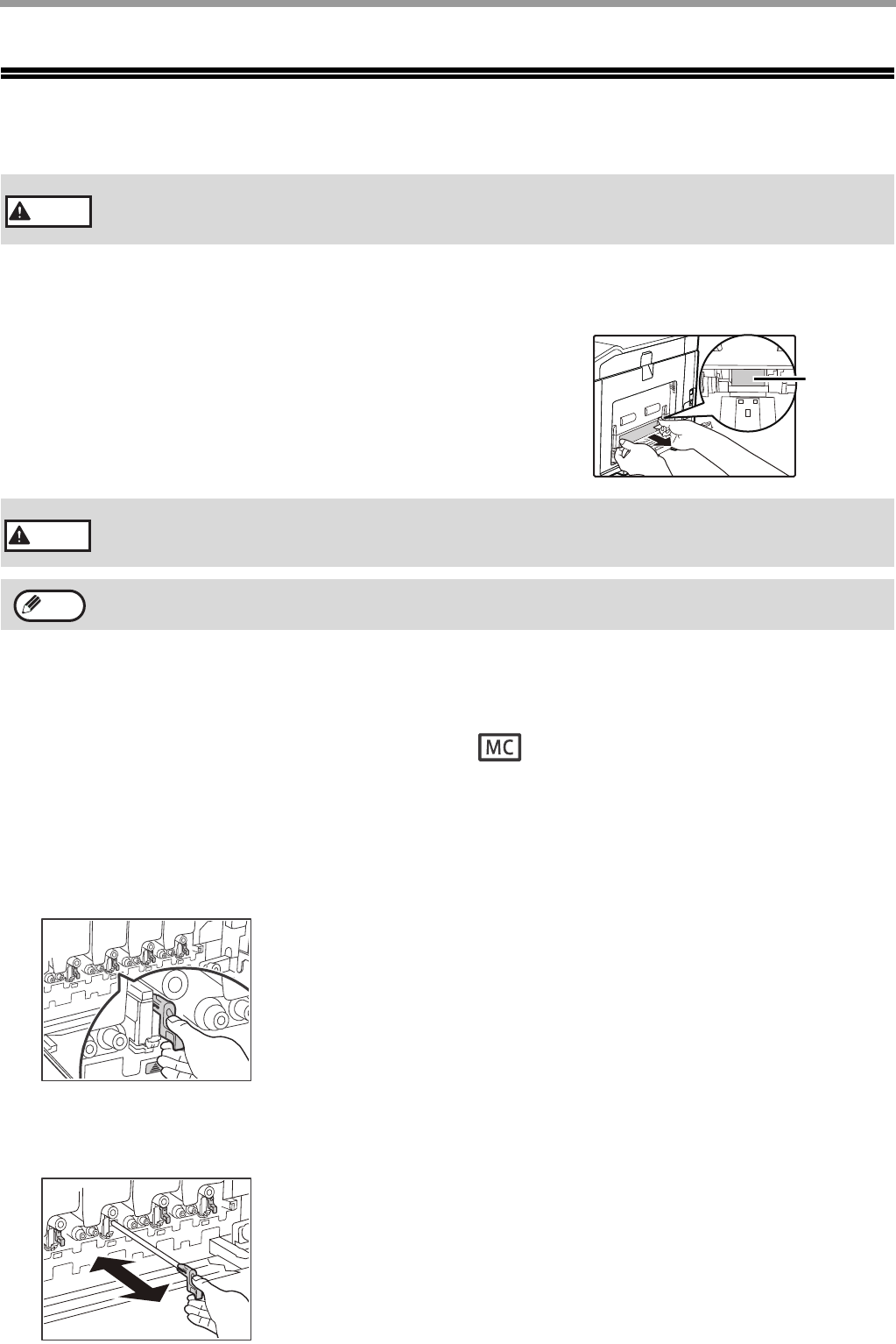
CLEANING THE BYPASS TRAY PAPER FEED ROLLER
If misfeeds occur frequently when feeding envelopes, heavy paper, etc.
through the bypass tray. Before starting, remove the paper from the
bypass tray. Turn the power switch off, remove the roller cover from the
bypass tray and wipe the paper feed roller at the feed slot of the bypass
tray with a soft, clean cloth dampened with alcohol or water.
After cleaning the paper feed roller, attach the roller cover on the bypass
tray, and then turn on the machine's power.
CLEANING THE MAIN CHARGER OF THE
PHOTOCONDUCTIVE DRUM
If black lines or coloured lines appear, use the charger cleaner to clean the main charger.
1
Procedure of "REPLACING THE TONER COLLECTION CONTAINER" (p.76), release
the toner collection container.
2
Grasp the green knob to release the lock and gently remove the charger cleaner.
3
Gently push the charger cleaner all the way in.
4
Repeat step 2 and 3 with each of the other main chargers.
Do not spray flammable cleaner gas. Gas from the spray may come in contact with the internal
electrical components or high-temperature parts of the fusing unit, creating a risk of fire or
electrical shock.
When cleaning the rollers, be careful not to injure your hands.
Do not touch the surface of the roller if your hands are dirty.
Warning
Paper feed
roller
Warning
Note
Ficheiro PDF · ·
Perguntas sobre Sharp MX-C300PL
Ainda não há perguntas sobre este manual. Faça a primeira.
Manuais e produtos relacionados com Digitalizar e Imprimir Sharp MX-C300PL
- Digitalizar e Imprimir Sharp MX-M200D Manual do Utilizador
 (100 páginas)
- Digitalizar e Imprimir Sharp AR-4551 Especificações
 (280 páginas)
- Digitalizar e Imprimir Sharp AR-M351N Especificações
(188 páginas)
- Digitalizar e Imprimir Sharp AR-M355 Manual do Utilizador
(12 páginas)
- Digitalizar e Imprimir Sharp MX-M904 Especificações
(122 páginas)
- Digitalizar e Imprimir Sharp JX-9600 Manual do Utilizador
 (14 páginas)
- Digitalizar e Imprimir Sharp CE-140P Manual do Utilizador
 (60 páginas)
- Digitalizar e Imprimir Sharp EL-2607R Especificações

 (2 páginas)
- Digitalizar e Imprimir Sharp DP-750 Manual de Serviço
(110 páginas)
- Digitalizar e Imprimir Sharp AR-M350N/M450N Manual do Utilizador
(12 páginas)
- Digitalizar e Imprimir Sharp ER-01PU Manual de Instruções
(241 páginas)
- Digitalizar e Imprimir Sharp UX-4000M - UX 4000 B/W Laser Printer Guia do Utilizador
(194 páginas)
- Digitalizar e Imprimir Sharp AR-NB3 Manual do Utilizador
(4 páginas)
- Digitalizar e Imprimir Sharp MX-5500N Especificações
(50 páginas)
- Digitalizar e Imprimir Sharp MX-M200D Manual de Serviço
(121 páginas)
- Digitalizar e Imprimir Sharp AR-4551 Manual do Utilizador
(44 páginas)
- Digitalizar e Imprimir Sharp MX-5500N Manual do Utilizador
(6 páginas)
- Digitalizar e Imprimir Sharp AR-RB1 Especificações
(140 páginas)
- Digitalizar e Imprimir Sharp AR-M351N Manual do Utilizador
(20 páginas)
- Digitalizar e Imprimir Sharp FO-2150CM Manual de Serviço
(132 páginas)