Sharp MX-C300PL Especificações Página 7: DIFFERENCES BETWEEN MODELS
 1
 2
 3
 4
 5
 6
 7
 8
 9
 10
 11
 12
 13
 14
 15
 16
 17
 18
 19
 20
 21
 22
 23
 24
 25
 26
 27
 28
 29
 30
 31
 32
 33
 34
 35
 36
 37
 38
 39
 40
 41
 42
 43
 44
 45
 46
 47
 48
 49
 50
 51
 52
 53
 54
 55
 56
 57
 58
 59
 60
 61
 62
 63
 64
 65
 66
 67
 68
 69
 70
 71
 72
 73
 74
 75
 76
 77
 78
 79
 80
 81
 82
 83
 84
 85
 86
 87
 88
 89
 90
 91
 92
 93
 94
 95
 96
 97
 98
 99
 100
 101
 102
 103
 104
 105
 106
 107
 108
7
1
BEFORE USING THE MACHINE
This chapter contains basic information that should be read before using the machine.
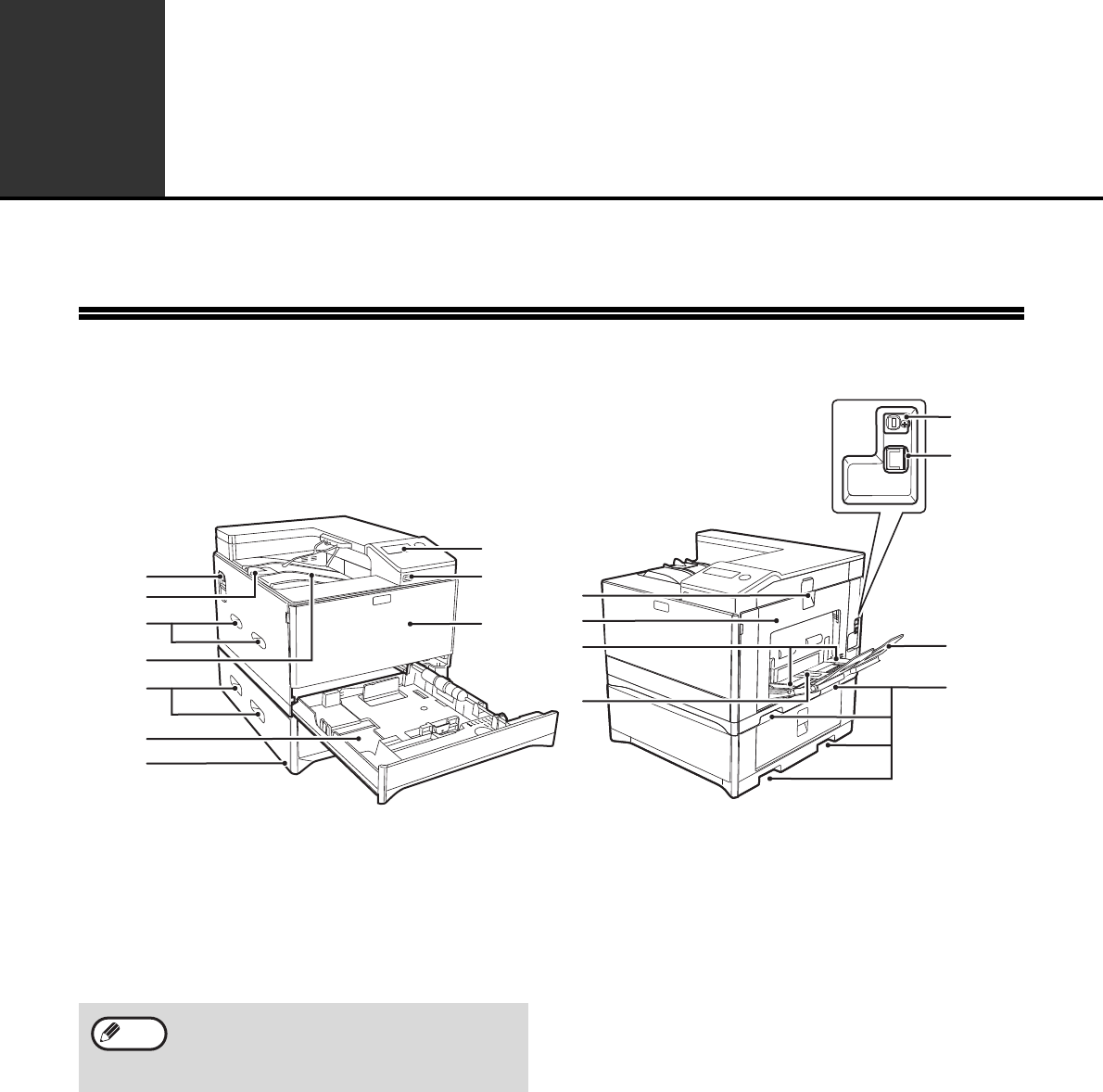
PART NAMES AND FUNCTIONS
(1)
Power switch
Press to turn the machine power on and off.
(2)
Output tray extension
When you eject the paper of A4 size or larger,
you can open to the outside.
(3)
Handles
Use to move the machine. When attaching tray
2, use the handle at the bottom.
(4)
Output tray
Printed pages are output to this tray.
(5)
Tray 1
Tray 1 can hold approximately 250 sheets of paper
(80
g
/m
2
(21 lbs.)). For restrictions on paper types,
sizes, and weights, refer to "USEABLE PAPER"
(p.13).
(6)
Tray 2 (Option)
Tray 2 can hold approximately 500 sheets of paper
(80
g
/m
2
(21 lbs.)). For restrictions on paper types,
sizes, and weights, refer to "USEABLE PAPER"
(p.13).
(7)
Operation panel
Contains operation keys and indicator lights.
(8)
USB 2.0 port (Type A)
This is used to connect a USB device such as
USB flash memory to the machine.
(9)
Front cover
Open to replace the toner cartridge etc.
(10) Side cover handle
Pull to open the side cover.
(11) Side cover
Open to remove misfed paper.
(12) Bypass tray guides
Adjust to the width of the paper when using the
bypass tray.
(13) Bypass tray
Special paper (heavy paper or transparency film)
can be fed from the bypass tray.
(14) USB 2.0 port (Type B)
Connect the USB cable to this connector when
the machine is used on a USB connection.
(15) LAN connector
Connect the LAN cable to this connector when
the machine is used on a network.
(16) Bypass tray extension
Open this tray when loading paper in the bypass
tray.
(14)
(3)
(15)
(16)
(10)
(11)
(4)
(2)
(7)
(8)
(1)
(3)
(3)
(9)
(5)
(6)
(12)
(13)
The main unit is extremely heavy, and thus two
people are required to do the work. When lifting
the main unit, grasp the handles on each side
firm.
Note
Ficheiro PDF · ·
Perguntas sobre Sharp MX-C300PL
Ainda não há perguntas sobre este manual. Faça a primeira.
Manuais e produtos relacionados com Digitalizar e Imprimir Sharp MX-C300PL
- Digitalizar e Imprimir Sharp MX-M200D Manual do Utilizador
 (100 páginas)
- Digitalizar e Imprimir Sharp AR-4551 Especificações
 (280 páginas)
- Digitalizar e Imprimir Sharp AR-M351N Especificações
(188 páginas)
- Digitalizar e Imprimir Sharp AR-M355 Manual do Utilizador
(12 páginas)
- Digitalizar e Imprimir Sharp MX-M904 Especificações
(122 páginas)
- Digitalizar e Imprimir Sharp JX-9600 Manual do Utilizador
 (14 páginas)
- Digitalizar e Imprimir Sharp CE-140P Manual do Utilizador
 (60 páginas)
- Digitalizar e Imprimir Sharp EL-2607R Especificações

 (2 páginas)
- Digitalizar e Imprimir Sharp DP-750 Manual de Serviço
(110 páginas)
- Digitalizar e Imprimir Sharp AR-M350N/M450N Manual do Utilizador
(12 páginas)
- Digitalizar e Imprimir Sharp ER-01PU Manual de Instruções
(241 páginas)
- Digitalizar e Imprimir Sharp UX-4000M - UX 4000 B/W Laser Printer Guia do Utilizador
(194 páginas)
- Digitalizar e Imprimir Sharp AR-NB3 Manual do Utilizador
(4 páginas)
- Digitalizar e Imprimir Sharp MX-5500N Especificações
(50 páginas)
- Digitalizar e Imprimir Sharp MX-M200D Manual de Serviço
(121 páginas)
- Digitalizar e Imprimir Sharp AR-4551 Manual do Utilizador
(44 páginas)
- Digitalizar e Imprimir Sharp MX-5500N Manual do Utilizador
(6 páginas)
- Digitalizar e Imprimir Sharp AR-RB1 Especificações
(140 páginas)
- Digitalizar e Imprimir Sharp AR-M351N Manual do Utilizador
(20 páginas)
- Digitalizar e Imprimir Sharp FO-2150CM Manual de Serviço
(132 páginas)