Sharp MX-C300PL Especificações Página 74: REPLACING THE TONER CARTRIDGE
 1
 2
 3
 4
 5
 6
 7
 8
 9
 10
 11
 12
 13
 14
 15
 16
 17
 18
 19
 20
 21
 22
 23
 24
 25
 26
 27
 28
 29
 30
 31
 32
 33
 34
 35
 36
 37
 38
 39
 40
 41
 42
 43
 44
 45
 46
 47
 48
 49
 50
 51
 52
 53
 54
 55
 56
 57
 58
 59
 60
 61
 62
 63
 64
 65
 66
 67
 68
 69
 70
 71
 72
 73
 74
 75
 76
 77
 78
 79
 80
 81
 82
 83
 84
 85
 86
 87
 88
 89
 90
 91
 92
 93
 94
 95
 96
 97
 98
 99
 100
 101
 102
 103
 104
 105
 106
 107
 108
74
TROUBLESHOOTING
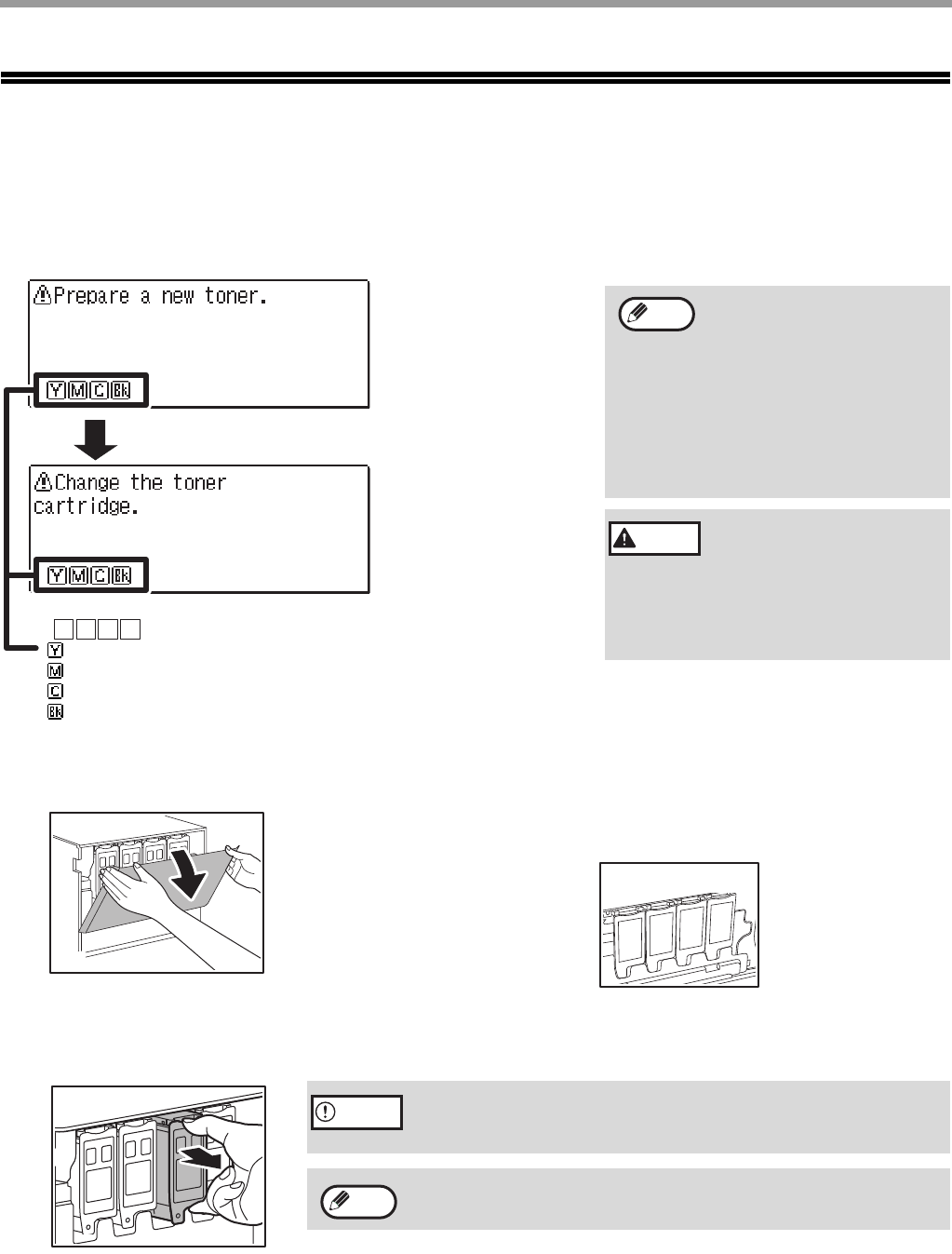
REPLACING THE TONER CARTRIDGE
When the
"Prepare a new toner."
appears, little toner remains.
You should keep one set of replacement toner cartridges on hand so that you can replace a toner cartridge immediately
when toner runs out.
Be sure to replace the toner cartridge when the message "Change the toner cartridge." appears.
1
Open the front cover.
Push on both ends of the front cover and open it.
Locations of colour toner cartridges
2
Grasp the handle of the top and bottom of the toner cartridge, pull the toner cartridge
out.
• If any one of the toner
colours runs out (including
black toner), colour printing
will not be possible.
If Y, M, or C toner runs out
but Bk toner remains, black
and white printing will still
be possible.
• Be sure to install 4 toner
cartridges (Y/M/C/Bk).
•
Do not throw the toner
cartridge into a fire.
Toner may splatter and
cause burns.
•
Store toner cartridges out
of the reach of small
children.
After removing the toner cartridge, do not shake it or tap on it. Doing so
may cause toner to leak from the cartridge. Put the old cartridge
immediately in the box of the new cartridge.
Keep used toner cartridges (do not discard them).
Your service technician will collect used toner cartridges.
If you continue to use the machine without replacing the cartridge,
the following message will appear when the toner runs out.
Colours that are running low or have run out of toner are indicated in
(
).
: Yellow toner
: Magenta toner
:
Cyan toner
: Black toner
Replace the toner cartridges of the indicated colours.
Note
Warning
(A)(B) (C) (D)
(A): Yellow
(B): Magenta
(C): Cyan
(D): Black
Caution
Note
Ficheiro PDF · ·
Perguntas sobre Sharp MX-C300PL
Ainda não há perguntas sobre este manual. Faça a primeira.
Manuais e produtos relacionados com Digitalizar e Imprimir Sharp MX-C300PL
- Digitalizar e Imprimir Sharp MX-M200D Manual do Utilizador
 (100 páginas)
- Digitalizar e Imprimir Sharp AR-4551 Especificações
 (280 páginas)
- Digitalizar e Imprimir Sharp AR-M351N Especificações
(188 páginas)
- Digitalizar e Imprimir Sharp AR-M355 Manual do Utilizador
(12 páginas)
- Digitalizar e Imprimir Sharp MX-M904 Especificações
(122 páginas)
- Digitalizar e Imprimir Sharp JX-9600 Manual do Utilizador
 (14 páginas)
- Digitalizar e Imprimir Sharp CE-140P Manual do Utilizador
 (60 páginas)
- Digitalizar e Imprimir Sharp EL-2607R Especificações

 (2 páginas)
- Digitalizar e Imprimir Sharp DP-750 Manual de Serviço
(110 páginas)
- Digitalizar e Imprimir Sharp AR-M350N/M450N Manual do Utilizador
(12 páginas)
- Digitalizar e Imprimir Sharp ER-01PU Manual de Instruções
(241 páginas)
- Digitalizar e Imprimir Sharp UX-4000M - UX 4000 B/W Laser Printer Guia do Utilizador
(194 páginas)
- Digitalizar e Imprimir Sharp AR-NB3 Manual do Utilizador
(4 páginas)
- Digitalizar e Imprimir Sharp MX-5500N Especificações
(50 páginas)
- Digitalizar e Imprimir Sharp MX-M200D Manual de Serviço
(121 páginas)
- Digitalizar e Imprimir Sharp AR-4551 Manual do Utilizador
(44 páginas)
- Digitalizar e Imprimir Sharp MX-5500N Manual do Utilizador
(6 páginas)
- Digitalizar e Imprimir Sharp AR-RB1 Especificações
(140 páginas)
- Digitalizar e Imprimir Sharp AR-M351N Manual do Utilizador
(20 páginas)
- Digitalizar e Imprimir Sharp FO-2150CM Manual de Serviço
(132 páginas)