Sharp MX-C300PL Especificações Página 67: MESSAGES
 1
 2
 3
 4
 5
 6
 7
 8
 9
 10
 11
 12
 13
 14
 15
 16
 17
 18
 19
 20
 21
 22
 23
 24
 25
 26
 27
 28
 29
 30
 31
 32
 33
 34
 35
 36
 37
 38
 39
 40
 41
 42
 43
 44
 45
 46
 47
 48
 49
 50
 51
 52
 53
 54
 55
 56
 57
 58
 59
 60
 61
 62
 63
 64
 65
 66
 67
 68
 69
 70
 71
 72
 73
 74
 75
 76
 77
 78
 79
 80
 81
 82
 83
 84
 85
 86
 87
 88
 89
 90
 91
 92
 93
 94
 95
 96
 97
 98
 99
 100
 101
 102
 103
 104
 105
 106
 107
 108
67
TROUBLESHOOTING
INDICATORS AND DISPLAY
MESSAGES
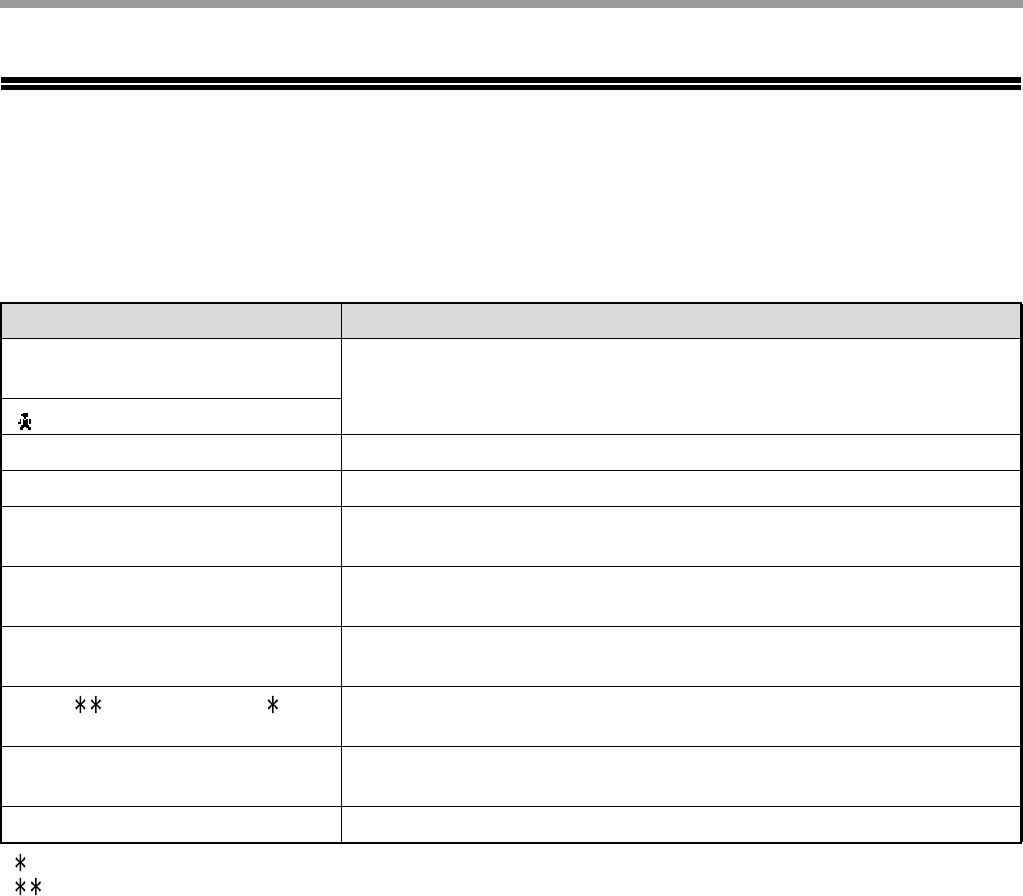
If one of the following messages appears in the display, take prompt action as instructed by the message.
< >: Tray number
<
>: Size of paper that should be loaded
Message
Action
Maintenance required. Call for
service.
Maintenance required soon. Contact your authorised service
representative.
(Maintenance icon)
Obtain replacement toner.
The toner cartridge must be replaced soon.
Install the toner cartridge.
Check to see if the toner cartridge has been installed properly.
Replace waste box.
Replace the toner collection container as explained in "REPLACING THE
TONER COLLECTION CONTAINER" (p.76).
Change the toner cartridge.
Replace the toner cartridge as explained in "REPLACING THE TONER
CARTRIDGE" (p.74).
Remove paper from the output tray.
The number of sheets in the output tray has reached the limit. Remove the
paper.
Load <
> paper into tray < >.
The paper size specified for the tray is different from the actual size.
(p.19)
Clear paper path.
Refer to "MISFEED REMOVAL" (p.68), check the location and remove the
misfeed.
Close the cover.
Make sure that the front cover and side cover are properly closed.
Ficheiro PDF · ·
Perguntas sobre Sharp MX-C300PL
Ainda não há perguntas sobre este manual. Faça a primeira.
Manuais e produtos relacionados com Digitalizar e Imprimir Sharp MX-C300PL
- Digitalizar e Imprimir Sharp MX-M200D Manual do Utilizador
 (100 páginas)
- Digitalizar e Imprimir Sharp AR-4551 Especificações
 (280 páginas)
- Digitalizar e Imprimir Sharp AR-M351N Especificações
(188 páginas)
- Digitalizar e Imprimir Sharp AR-M355 Manual do Utilizador
(12 páginas)
- Digitalizar e Imprimir Sharp MX-M904 Especificações
(122 páginas)
- Digitalizar e Imprimir Sharp JX-9600 Manual do Utilizador
 (14 páginas)
- Digitalizar e Imprimir Sharp CE-140P Manual do Utilizador
 (60 páginas)
- Digitalizar e Imprimir Sharp EL-2607R Especificações

 (2 páginas)
- Digitalizar e Imprimir Sharp DP-750 Manual de Serviço
(110 páginas)
- Digitalizar e Imprimir Sharp AR-M350N/M450N Manual do Utilizador
(12 páginas)
- Digitalizar e Imprimir Sharp ER-01PU Manual de Instruções
(241 páginas)
- Digitalizar e Imprimir Sharp UX-4000M - UX 4000 B/W Laser Printer Guia do Utilizador
(194 páginas)
- Digitalizar e Imprimir Sharp AR-NB3 Manual do Utilizador
(4 páginas)
- Digitalizar e Imprimir Sharp MX-5500N Especificações
(50 páginas)
- Digitalizar e Imprimir Sharp MX-M200D Manual de Serviço
(121 páginas)
- Digitalizar e Imprimir Sharp AR-4551 Manual do Utilizador
(44 páginas)
- Digitalizar e Imprimir Sharp MX-5500N Manual do Utilizador
(6 páginas)
- Digitalizar e Imprimir Sharp AR-RB1 Especificações
(140 páginas)
- Digitalizar e Imprimir Sharp AR-M351N Manual do Utilizador
(20 páginas)
- Digitalizar e Imprimir Sharp FO-2150CM Manual de Serviço
(132 páginas)