Sharp MX-C300PL Especificações Página 96: (FOR USERS)
 1
 2
 3
 4
 5
 6
 7
 8
 9
 10
 11
 12
 13
 14
 15
 16
 17
 18
 19
 20
 21
 22
 23
 24
 25
 26
 27
 28
 29
 30
 31
 32
 33
 34
 35
 36
 37
 38
 39
 40
 41
 42
 43
 44
 45
 46
 47
 48
 49
 50
 51
 52
 53
 54
 55
 56
 57
 58
 59
 60
 61
 62
 63
 64
 65
 66
 67
 68
 69
 70
 71
 72
 73
 74
 75
 76
 77
 78
 79
 80
 81
 82
 83
 84
 85
 86
 87
 88
 89
 90
 91
 92
 93
 94
 95
 96
 97
 98
 99
 100
 101
 102
 103
 104
 105
 106
 107
 108
96
WEB FUNCTIONS IN THE MACHINE
ABOUT THE WEB PAGES
(FOR USERS)
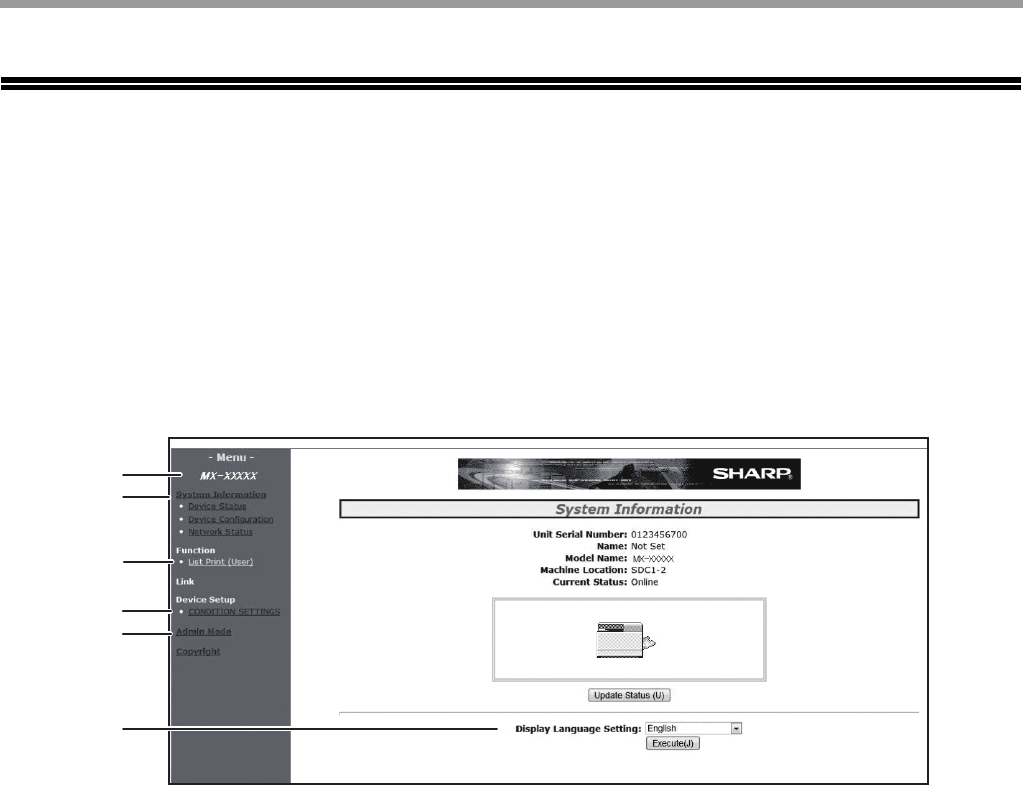
When you access the user Web pages in the machine, the following page will appear in your browser.
A menu frame appears on the left side of the page. When you click an item in the menu, a screen appears in the
right frame that allows you to configure settings for that item.
(1) Menu frame
Click a setting in the menu to configure it.
(2) System Information
Shows the current status of the machine and
model name.
• Device Status
Shows the current status of the machine, paper
trays, output trays, toner and other supplies, and
page counts.
Out of paper and other warnings appear in red.
• Device Configuration
Shows what options are installed.
• Network Status
Shows the network status. Information on
"General" and "TCP/IP" is shown on the
respective pages.
(3) Data List Print
You can print out the various settings that you have
selected.
(4) Condition Settings
Configure basic printer settings and printer
language settings.
"CONFIGURING THE PRINTER CONDITION
SETTINGS" (p.97)
(5) Admin Mode
To open the Web pages for the administrator, click
here and then enter the administrator's user name
and password.
"ABOUT THE WEB PAGES (FOR THE
ADMINISTRATOR)" (p.100)
"PROTECTING INFORMATION PROGRAMMED
IN THE WEB PAGE ([Passwords])" (p.102)
(6) Display Language Setting
Select the desired language setting from the
pull-down menu.
(6)
(2)
(1)
(3)
(4)
(5)
Ficheiro PDF · ·
Perguntas sobre Sharp MX-C300PL
Ainda não há perguntas sobre este manual. Faça a primeira.
Manuais e produtos relacionados com Digitalizar e Imprimir Sharp MX-C300PL
- Digitalizar e Imprimir Sharp MX-M200D Manual do Utilizador
 (100 páginas)
- Digitalizar e Imprimir Sharp AR-4551 Especificações
 (280 páginas)
- Digitalizar e Imprimir Sharp AR-M351N Especificações
(188 páginas)
- Digitalizar e Imprimir Sharp AR-M355 Manual do Utilizador
(12 páginas)
- Digitalizar e Imprimir Sharp MX-M904 Especificações
(122 páginas)
- Digitalizar e Imprimir Sharp JX-9600 Manual do Utilizador
 (14 páginas)
- Digitalizar e Imprimir Sharp CE-140P Manual do Utilizador
 (60 páginas)
- Digitalizar e Imprimir Sharp EL-2607R Especificações

 (2 páginas)
- Digitalizar e Imprimir Sharp DP-750 Manual de Serviço
(110 páginas)
- Digitalizar e Imprimir Sharp AR-M350N/M450N Manual do Utilizador
(12 páginas)
- Digitalizar e Imprimir Sharp ER-01PU Manual de Instruções
(241 páginas)
- Digitalizar e Imprimir Sharp UX-4000M - UX 4000 B/W Laser Printer Guia do Utilizador
(194 páginas)
- Digitalizar e Imprimir Sharp AR-NB3 Manual do Utilizador
(4 páginas)
- Digitalizar e Imprimir Sharp MX-5500N Especificações
(50 páginas)
- Digitalizar e Imprimir Sharp MX-M200D Manual de Serviço
(121 páginas)
- Digitalizar e Imprimir Sharp AR-4551 Manual do Utilizador
(44 páginas)
- Digitalizar e Imprimir Sharp MX-5500N Manual do Utilizador
(6 páginas)
- Digitalizar e Imprimir Sharp AR-RB1 Especificações
(140 páginas)
- Digitalizar e Imprimir Sharp AR-M351N Manual do Utilizador
(20 páginas)
- Digitalizar e Imprimir Sharp FO-2150CM Manual de Serviço
(132 páginas)