Sharp XE-A113 Manual do Utilizador Página 52
- Página / 404
- Índice
- MARCADORES

- With Quick Start Guide 1
- Mit Schnellstartanleitung 1
- Con Guía de inicio rápido 1
- Met Gids voor snel starten 1
- CONTENTS 4
- Part2 FOR THE OPERATOR 5
- Part3 FOR THE MANAGER 6
- Part1 QUICK START GUIDE 7
- Keyboard layout 8
- Key names 8
- Mode Switch and Mode Keys 8
- Keyboard 8
- (Pop-up type) 9
- Machine state symbols 9
- Drawer Lock Key 9
- PREPARING THE CASH REGISTER 10
- Installing Batteries 11
- Installing a Paper Roll 12
- Part2 Part3 13
- HELP FUNCTION 14
- BASIC FUNCTION PROGRAMMING 15
- Guidance for text programming 16
- Language Selection 17
- Date and Time Programming 17
- Tax rate programming 18
- Tax Programming 18
- Department status 19
- Department Programming 19
- Preset unit price 20
- PLU code 22
- Unit price 22
- Associated dept 22
- PLU/subdepartment selection 23
- Clerk names (12 digits) 24
- Text Programming 24
- BASIC SALES ENTRY 26
- PLU Entry 27
- CORRECTION 28
- Subtotal Void 29
- FULL SALES REPORT (Z REPORT) 31
- Periodic consolidation 32
- BEFORE CALLING FOR SERVICE 33
- Part2 FOR THE OPERATOR 34
- Single item entries 35
- Item Entries 35
- Repeat entries 36
- Multiplication entries 37
- Cash or cheque tendering 38
- Finalization of Transaction 38
- Displaying Subtotals 38
- Credit sale 39
- Mixed-tender sale 39
- VAT/ tax system 39
- (When the manual 40
- VAT 1-4 system 40
- is selected) 40
- OPTIONAL FEATURES 41
- Refund entries 42
- Currency exchange 43
- Auxiliary Payment Treatment 43
- Received-on-account entries 44
- Paid-out entries 44
- No sale (exchange) 44
- Automatic Sequence Key ( 44
- Part3 FOR THE MANAGER 45
- Rate for 47
- Amount for 47
- Miscellaneous Key Programming 47
- Percent rate limitation for 48
- Function parameters for 48
- Other Text Programming 51
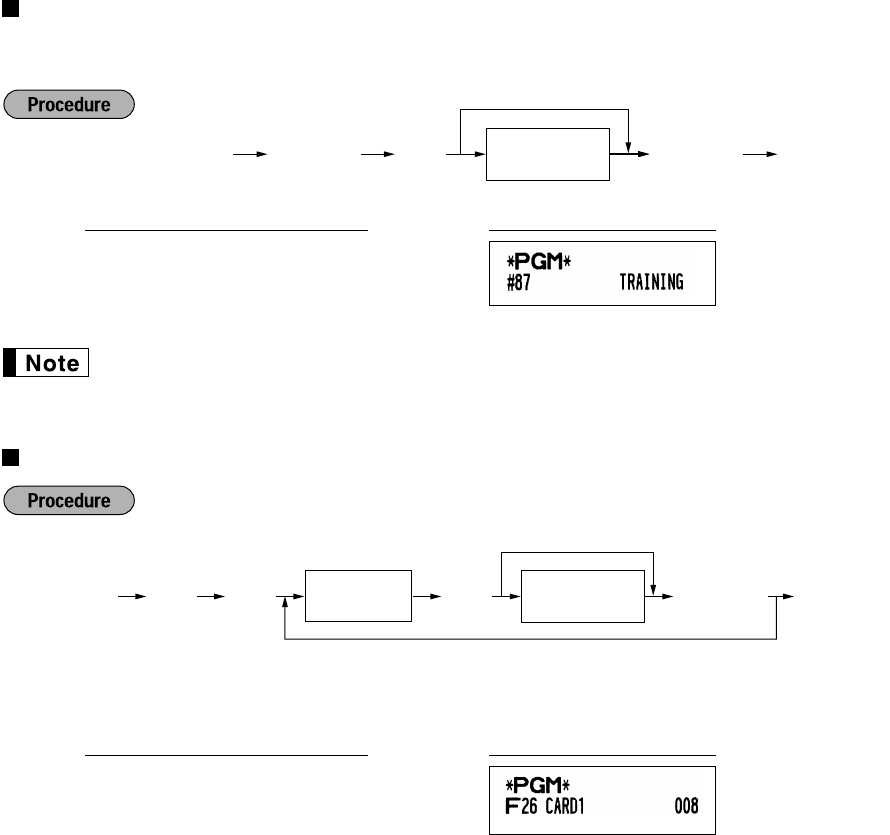
- Function text (12 digits) 52
- List of function texts 53
- ADVANCED FUNCTION PROGRAMMING 54
- FOR THE MANAGER 55
- Print format 56
- Receipt print format 56
- Other programming 57
- Job code: 63 58
- * Item: Selection: Entry: 58
- Job code: 64 58
- Part2Part1 61
- Power save mode 62
- Logo message print format 63
- Thermal printer density 63
- Transaction 64
- (key entry) 64
- EURO system settings 65
- EURO Programming 65
- Reading Stored Programs 66
- Sample printouts 67
- 2 Programming report 2 68
- 6 PLU programming report 68
- TRAINING MODE 69
- READING (X) AND RESETTING (Z) 70
- OF SALES TOTALS 70
- Hourly report 71
- Individual clerk report 71
- Full clerk report 71
- Daily Sales Totals 71
- EJ report title 72
- EJ report end title 72
- OVERRIDE ENTRIES 73
- EURO MIGRATION FUNCTION 74
- Preset data and time 76
- Remaining days 76
- EURO status 76
- OPERATOR MAINTENANCE 77
- To the printer 78
- Incorrect 78
- SPECIFICATIONS 81
- 1. In the European Union 82
- EINLEITUNG 83
- Teil 2 FÜR DEN BEDIENER 85
- Teil 1 SCHNELLSTARTANLEITUNG 87
- Tastaturanordnung 88
- Tastenbezeichnungen 88
- Tastatur 88
- Bedieneranzeige Kundenanzeige 89
- (Pop-Up-Typ) 89
- Registrierkassen-Statussymbol 89
- Anzeigen 89
- Schubladenschlüssel 89
- Einsetzen der Batterien 91
- Einsetzen einer Papierrolle 92
- Teil2 Teil3 93
- HELP-TASTE 94
- PROGRAMMIERUNG DER 95
- GRUNDLEGENDEN FUNKTIONEN 95
- Einstellung des Datums 97
- Einstellung der Uhrzeit 97
- Sprachauswahl 97
- Mehrwertsteuerprogrammierung 98
- Warengruppenstatus 99
- Einzelpreis 100
- PLU-Code 102
- Zugeordnete 102
- Warengruppe 102
- Bedienernamen (12 Stellen) 104
- Textprogrammierung 104
- 3 Kopfzeilen 105
- 6 Kopfzeilen 105
- 3 Kopfzeilen und 105
- 3 Fusszeilen 105
- (Vorgabeeinstellung) 105
- GRUNDLEGENDE REGISTRIERUNGEN 106
- PLU-Registrierung 107
- KORREKTUREN 108
- Zwischensummenstorno 109
- Gesamtumsatzbericht 111
- Periodische Berichte 112
- Fehlercodetabelle 113
- Teil 2 FÜR DEN BEDIENER 114
- Kassenbonduplikat 114
- Einzelpostenregistrierung 115
- Postenregistrierungen 115
- Wiederholungsregistrierung 116
- Multiplikationsregistrierung 117
- Bar- oder Scheckeingabe 118
- Abschluss einer Transaktion 118
- Anzeige von Zwischensummen 118
- Prozentsätzen) 119
- (Wenn das manuelle 120
- MwSt-System 1-4 120
- OPTIONALE MERKMALE 121
- Retourenregistrierung 122
- Registrierung ist 123
- Einzahlungsregistrierungen 124
- Auszahlungsregistrierungen 124
- Kein Verkauf (Geldwechsel) 124
- VOR DER PROGRAMMIERUNG 125
- PROGRAMMIERUNG 127
- ZUSÄTZLICHER FUNKTIONEN 127
- Prozentsatzgrenze 128
- FÜR DEN GESCHÄFTSINHABER 129
- @s, X, Y, c, b, r 130
- Andere Textprogrammierung 131
- Funktionstext (12 Stellen) 132
- Funktionstextliste 133
- WEITERFÜHRENDE 134
- FUNKTIONSPROGRAMMIERUNG 134
- 00000100 135
- Druckformat 136
- Kassenbon-Druckformat 136
- Sonstige Programmierung 137
- Job-Code: 63 138
- * Positionen: Wahl: Eingabe: 138
- Job-Code: 64 138
- Teil2 Teil1 141
- Stromsparmodus 142
- Logodruckformat 143
- Thermodrucker-Druckdichte 143
- Schulungsmodus 143
- Automatik 144
- Einstellung 144
- EURO-Programmierung 145
- 01072009 146
- Druckbeispiele 147
- 2 Programmierbericht 2 148
- 6 PLU-Programmierbericht 148
- SCHULUNGSBETRIEBSART 149
- ABRUF (X) UND NULLSTELLUNG 150
- (Z) VON UMSÄTZEN 150
- PLU-Bericht (von - bis) 151
- Stundenumsatzbericht 151
- Einzelbedienerbericht 151
- Gesamtbedienerbericht 151
- Tagesumsatzberichte 151
- ABRUF UND NULLSTELLUNG DES 152
- ELEKTRONISCHEN JOURNALS (EJ) 152
- ÜBERSCHREIBUNG VON BETRAGS 153
- EINGABE-BEGRENZUNGEN 153
- EURO-UMRECHNUNGSFUNKTION 154
- Noch verbleibende Tage 156
- EURO-Status 156
- WARTUNG DURCH DEN BEDIENER 157
- Wichtig: 158
- TECHNISCHE DATEN 161
- 1. In der Europäischen Union 162
- INTRODUCTION 163
- IMPORTANT 163
- TABLE DES MATIERES 164
- Partie 2 POUR L’OPERATEUR 165
- Partie 3 POUR LE DIRECTEUR 166
- COMPOSANTS ET LEURS FONCTIONS 167
- Disposition du clavier 168
- Noms des touches 168
- (Type à éjection) 169
- Affichages 169
- Clé de verrouillage du tiroir 169
- Installation des piles 171
- Partie1 173
- Partie2 Partie3 173
- FONCTION D’AIDE 174
- GUIDE DE DEMARRAGE RAPIDE 175
- Choix d’une langue 177
- Programmation de taxes 178
- Statuts des rayons 179
- Programmation de rayons 179
- Prix unitaire préréglé 180
- Code du PLU 182
- Prix unitaire 182
- Rayon associé 182
- Programmation d’un texte 184
- RECTIFICATION 188
- Annulation d’un total partiel 189
- Regroupement périodique 192
- Table des codes d’erreurs 193
- Partie 2 POUR L’OPERATEUR 194
- Entrées d’un seul article 195
- Entrées d’articles 195
- Entrées répétées 196
- Entrées multiplicatives 197
- Vente à crédit 199
- Vente contre une offre mixte 199
- Système de T.V.A./taxes 199
- (Lorsque le système 200
- FONCTIONS FACULTATIVES 201
- Entrées de remboursements 202
- Change d’une monnaie 203
- Partie 3 POUR LE DIRECTEUR 205
- Limite du pourcentage 208
- Paramètres de fonction pour 209
- @s, X, Y, c, b, rR 210
- Touches des caractères 211
- (4 chiffres max.) 211
- Liste des textes de fonctions 213
- Numéro de l’enregistreuse 214
- Numéro consécutif 214
- Partie3 215
- Partie2Partie1 215
- Autres programmations 217
- Code de travail: 63 218
- * Article: Sélection: Entrée: 218
- Code de travail: 64 218
- POUR LE DIRECTEUR 219
- Mode d’économie d’énergie 222
- Réglage 224
- AUTOMATIQUE 224
- Réglages du système de l’EURO 225
- Programmation de l’EURO 225
- Exemples d’impressions 227
- MODE DE FORMATION 229
- LECTURE (X) ET REMISE A ZERO 230
- (Z) DES TOTAUX DE VENTES 230
- Impression de 232
- Titre du rapport EJ 232
- Titre de la fin du rapport EJ 232
- ENTREES DE SURPASSEMENTS 233
- Date et heure préréglées 236
- Jours restants 236
- Statut de l’Euro 236
- ENTRETIEN PAR L’OPERATEUR 237
- Détecteur 240
- Tête d’impression 240
- DONNEES TECHNIQUES 241
- INTRODUCCION 243
- IMPORTANTE 243
- Parte 2 PARA EL OPERADOR 245
- PARTES Y SUS FUNCIONES 247
- Disposición del teclado 248
- Nombres de las teclas 248
- (tipo emergente) 249
- Visualizadores 249
- Instalación de las pilas 251
- Parte2 Parte3 253
- FUNCION DE AYUDA 254
- GUIA DE INICIO RAPIDO 255
- Selección del idioma 257
- Programación de los impuestos 258
- Estado de sección 259
- Programación de secciones 259
- Precio unitario preajustado 260
- Procedimiento 262
- Selección de PLU/subsección 263
- Programación de texto 264
- REGISTRO BASICO DE VENTAS 266
- Registro de PLU 267
- CORRECCION 268
- Cancelación del subtotal 269
- Informe de ventas completo 271
- Consolidación periódica 272
- Tabla de códigos de error 273
- Parte 2 PARA EL OPERADOR 274
- Registros de un solo artículo 275
- Registros de artículos 275
- Registros repetidos 276
- Registros de multiplicación 277
- Ventas a crédito 279
- Sistema IVA/impuestos 279
- (Cuando se selecciona 280
- CARACTERISTICAS OPCIONALES 281
- Registros de devolución 282
- Cambio de divisas 283
- Tratos de pagos auxiliares 283
- ANTES DE LA PROGRAMACION 285
- Para programar cero 288
- Parámetros de función para 289
- Otras programaciones de texto 291
- Texto de función (12 dígitos) 292
- Lista de textos de función 293
- Número de caja registradora 294
- Número consecutivo 294
- Parte2Parte1 295
- Formato de impresión 296
- Otras programaciones 297
- Código de tarea: 63 298
- Código de tarea: 64 298
- PARA EL ADMINISTRADOR 299
- Modo de ahorro de energía 302
- *Densidad de impresora 303
- Ajustes del sistema del EURO 305
- Programación del EURO 305
- Tiempo (Hora) (00 a 23) 306
- Fecha (Día-Mes-Año) 306
- (siete u ocho dígitos) 306
- Para ajustar todo ceros 306
- Impresiones de muestra 307
- MODO DE INSTRUCCION 309
- LOS TOTALES DE VENTAS 310
- Impresión de la 312
- Título de informe EJ 312
- Título de fin de informe EJ 312
- REGISTROS DE ANULACION 313
- FUNCION DE MIGRACION DEL EURO 314
- Fecha y hora preajustadas 316
- Días restantes 316
- Estado de EURO 316
- Precaución 318
- ESPECIFICACIONES 321
- 1. En la Unión Europea 322
- INTRODUCTIE 323
- BELANGRIJK 323
- INHOUDSOPGAVE 324
- Deel 3 VOOR DE MANAGER 326
- ONDERDELEN EN FUNCTIES 327
- Overzicht van toetsenbord 328
- Namen van toetsen 328
- Toetsenbord 328
- (Omhoog-klap type) 329
- Displays 329
- Ladeslot en sleutel 329
- VOORBEREIDING VOOR DE KASSA 330
- Plaatsen van batterijen 331
- Plaatsen van een papierrol 332
- Deel2 Deel3 333
- HELP-FUNCTIE 334
- PROGRAMMEREN VAN 335
- BASISFUNCTIES 335
- Taalkeuze 337
- Programmeren van belasting 338
- Afdelingstatus 339
- Programmeren van afdeling 339
- Voor-ingestelde prijs 340
- (Programmeren van FRUIT voor 341
- Unit-prijs 342
- Overeenkomende 342
- PLU/subafdeling keuze 343
- Programmeren van tekst 344
- Kop met 3-regels 345
- 3-regels 345
- (Fabrieksinstelling) 345
- Invoeren van PLU 347
- CORRECTIES 348
- Annuleren van subtotaal 349
- VOLLEDIG VERKOOPOVERZICHT 351
- (Z OVERZICHT) 351
- Periodiek overzicht 352
- VOORDAT U VOOR REPARATIE BELT 353
- INFORMATIE VOOR INVOEREN VAN 354
- EENVOUDIGE VERKOPEN 354
- Invoeren van onderdelen 355
- Invoeren van herhalingen 356
- Invoer met vermenigvuldiging 357
- Contante betaling of cheque 358
- Voltooien van een transactie 358
- Tonen van subtotaal 358
- Verkoop op krediet 359
- Verkoop met gemengde betaling 359
- BTW/belastingsysteem 359
- (Indien het handmatige 360
- BTW 1-4 systeem is 360
- EXTRA FUNCTIES 361
- Invoeren van terugbetalingen 362
- Buitenlands geld 363
- Invoeren van uitbetalingen 364
- Geen verkoop (wisselen) 364
- Deel 3 VOOR DE MANAGER 365
- Waarde voor 367
- Bedrag voor 367
- Limiet voor percentage voor 368
- Functieparameters voor 368
- Lijst met tekst voor functies 373
- GEAVANCEERDE FUNCTIES 374
- VOOR DE MANAGER 375
- Printformaat 376
- Bon printformaat 376
- Overige programmering 377
- Taak-code: 63 378
- * Onderdeel: Keuze: Invoer: 378
- Taak-code: 64 378
- Deel2Deel1 381
- Energiebesparingsfunctie 382
- Dichtheid thermische printer 383
- Transactie 384
- (invoer door toets) 384
- Programmering voor de EURO 385
- Voorbeeld van afdrukken 387
- 2 Programmeringsoverzicht 2 388
- TRAININGSFUNCTIE 389
- LEZEN (X) EN TERUGSTELLEN (Z) 390
- VAN VERKOOPTOTALEN 390
- Uuroverzicht 391
- Volledig bediende-overzicht 391
- Totaal dagelijkse verkopen 391
- EJ overzicht) 392
- OVERSCHRIJVEN VAN INVOER 393
- FUNCTIE VOOR EURO-MODIFICATIE 394
- Ingestelde datum en tijd 396
- Resterend aantal dagen 396
- EURO fase 396
- ONDERHOUD VOOR BEDIENING 397
- Naar de printer 398
- TECHNISCHE GEGEVENS 401
- 1. In de Europese Unie 402
- Geräuschpegel LpA: 51,9 dB 403
- TINSM2564RCZZ 404
Manuais e produtos relacionados com Vídeo Sharp XE-A113

 (2 páginas)
(2 páginas)
(2 páginas)


 (176 páginas)
(2 páginas)
(2 páginas)
(2 páginas)
(2 páginas)
(2 páginas)
(12 páginas)
(2 páginas)
(2 páginas)
(2 páginas)
(8 páginas)
(2 páginas)
(2 páginas)
(2 páginas)
(176 páginas)
(2 páginas)
(2 páginas)
(2 páginas)
(2 páginas)
(2 páginas)
(12 páginas)
(2 páginas)
(2 páginas)
(2 páginas)
(8 páginas)
(2 páginas)
(2 páginas)
(2 páginas)
© 2020, manymanuals-pt.com. Todos os direitos reservados. | 0.056 s |
 Manymanuals.com
 Manymanuals.de
 Manymanuals.fr
 Manymanuals.it
 Manymanuals.pl
 Manymanuals.cz
 Manymanuals.es
 Manymanuals-pt.com
Comentários a estes Manuais