Sharp MX-M1100 Especificações Página 26: Expandability
 1
 2
 3
 4
 5
 6
 7
 8
 9
 10
 11
 12
 13
 14
 15
 16
 17
 18
 19
 20
 21
 22
 23
 24
 25
 26
 27
 28
 29
 30
 31
 32
 33
 34
 35
 36
 37
 38
 39
 40
 41
 42
 43
 44
 45
 46
 47
 48
 49
 50
 51
 52
 53
 54
 55
 56
 57
 58
 59
 60
 61
 62
 63
 64
 65
 66
 67
 68
 69
 70
 71
 72
 73
 74
 75
 76
 77
 78
 79
 80
 81
 82
 83
 84
 85
 86
 87
 88
 89
 90
 91
 92
 93
 94
 95
 96
 97
 98
MX-M1100/950/850 Sales Guide
Confidential (Ver. 0.5)
26
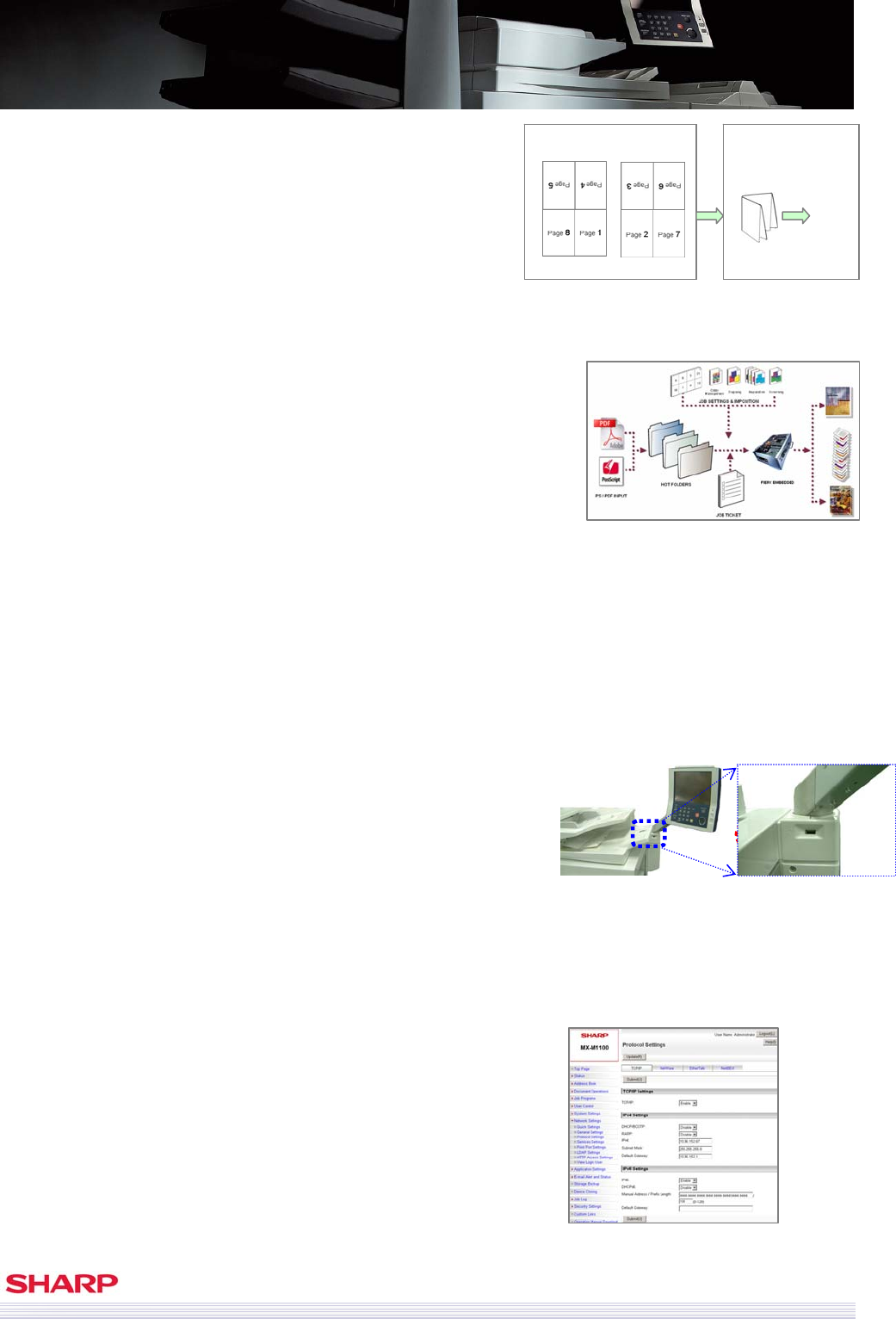
Impose
(Impose printing)
Hot Folders
(job settings & imposition printing)
�
Data security kit
(Data Erase / Data Encryption / Document Control)
Digital copiers/printers or multifunction products can retain hundreds of pages of
confidential
information from previous jobs on their hard disks or internal memory. To protect this, the optional Data
Security Kit automatically encrypts the data as it is written and securely overwrites it when the job has
been completed. (up to seven times)
�
USB devices
For higher operabillity and security, The MX- M1100/950/850
series has a USB port for USB devices. (e.g. Key board /
memory stick / IC Card reader / etc.)
It is easily accessible as it is positioned on the
front panel of the main unit.
�
Supporting next generation network protocol “IPv6”
Some forward-thinking enterprises and public offices have already began to prepare for ‘The Next
Generation Infrastructure’. The MX- M1100/950/850 series already meets their requirements by offering
‘IPv6 support’.
(Available at a later date)
Users can save frequently-used settings (e.g. Printing device,
size of the form, the number of outputs, double-side printing, and other
………..
various output settings) to ‘Hot Folders’. These can be retrieved at any time
by using ‘drag and drop’ the print-data to the folder.
Example of Imposition
Page 1
Front side
Rear side
Folding
Trimming
Imposition is the process of arranging pages in the proper print order and
format to ensure a correct page sequence once printed sheets are folded and
trimmed. And this is sometimes required by ‘Pay for print users’ and ‘In plant
print users’.’EFI Impose’ streamlines and automates this process.
It can increase job speed and reduce costs about error
Ficheiro PDF · ·
Perguntas sobre Sharp MX-M1100
Ainda não há perguntas sobre este manual. Faça a primeira.
Manuais e produtos relacionados com Copiadoras Sharp MX-M1100
- Copiadoras Sharp DX-C400 - Color - All-in-One Manual do Utilizador
 (12 páginas)
- Copiadoras Sharp AR-407 Manual do Utilizador
(6 páginas)
- Copiadoras Sharp DM-1505 - B/W Laser Printer Manual do Utilizador
(4 páginas)
- Copiadoras Sharp AR-NB2 Guia de Configuração
(25 páginas)
- Copiadoras Sharp MX-PNX1D Manual do Utilizador
(12 páginas)
- Copiadoras Sharp SF-2414 Manual de Serviço
(131 páginas)
- Copiadoras Sharp AL-1250 - B/W Laser Printer Guia do Utilizador
(130 páginas)
- Copiadoras Sharp Multi Access Manual do Utilizador
(12 páginas)
- Copiadoras Sharp MX-M503 Manual do Utilizador
(12 páginas)
- Copiadoras Sharp AR-CF2 Manual do Utilizador
(12 páginas)
- Copiadoras Sharp AR-M160 Especificações
(33 páginas)
- Copiadoras Sharp AR-D25 Manual do Utilizador
(6 páginas)
- Copiadoras Sharp MX-C310 Manual do Utilizador
(12 páginas)
- Copiadoras Sharp AL-1631 Especificações
(100 páginas)
- Copiadoras Sharp AR-235 Instruções de Operação
(130 páginas)
- Copiadoras Sharp M317 - AR B/W Laser Manual de Instruções
(104 páginas)
- Copiadoras Sharp Multi Access Manual do Utilizador
(12 páginas)
- Copiadoras Sharp AL-1551CS Especificações
(54 páginas)
- Copiadoras Sharp AR-C170M Manual do Utilizador
(28 páginas)
- Copiadoras Sharp AR-FX4 Manual de Serviço
(98 páginas)