Sharp PG-MB60X Especificações Página 45
- Página / 84
- Índice
- RESOLUÇÃO DE PROBLEMAS
- MARCADORES

- PG-MB60X 1
- Model No.: PG-MB60X 2
- Serial No.: 2
- Introduction 5
- WARNING: 6
- PRODUCT DISPOSAL 6
- Pages 68 and 69 7
- Contents 8
- Reference 9
- IMPORTANT SAFEGUARDS 10
- 8 inches (20 cm) of space 11
- SETUP GUIDE 13
- Accessories 14
- Part Names and Functions 15
- Projector (Rear View) 17
- Remote Control 18
- 2 Insert the batteries 19
- Using the Remote Control 19
- Setup and Projection 20
- 4. Adjust the angle 21
- 7. Turn the Power off 21
- 6. Select the INPUT mode 21
- How to Use the 22
- Storage Case 22
- Setting up the Projector 23
- Projecting a Reversed Image 24
- Connections 25
- Cable adaptor 26
- (commercially available) 26
- Connecting to a Computer 27
- Connecting to Video Equipment 29
- Amplifier 32
- Connecting the Power Cord 33
- Turning the Projector on 33
- Turning the Power off 33
- Using the Adjustment 34
- Correcting Trapezoidal 35
- Distortion 35
- Adjusting the Focus 36
- Switching the INPUT 37
- Displaying the Black 38
- Screen and Turning off 38
- Displaying an Enlarged 38
- Portion of an Image 38
- Freezing a Moving 39
- Selecting the Picture 39
- Resize Mode 40
- Basic Operation 41
- Menu Items 42
- Useful Features 43
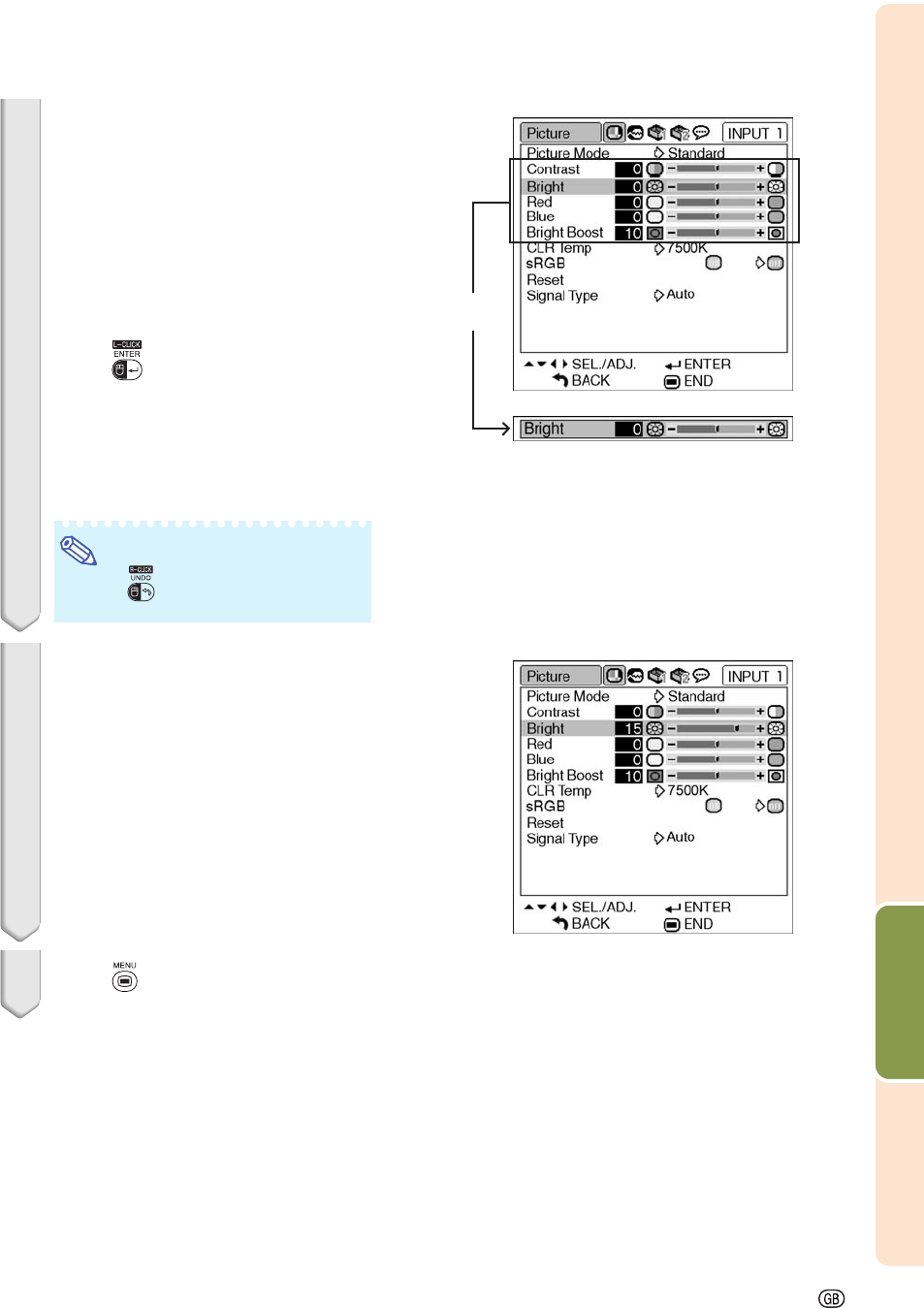
- Menu Selections (Adjustments) 44
- To adjust the pro 45
- Menu Selections (Settings) 46
- 3 Press 47
- 4 Press 47
- 5 Press 47
- 6 Press 47
- Selecting the Picture Mode 48
- Adjusting the Image 48
- Emphasizing the Contrast 49
- Signal Type Setting 50
- Adjusting the Computer 51
- Auto Sync Adjustment 52
- Checking the Lamp Life 53
- Setting the Resize Mode 53
- Setting the Video System 54
- Setting On-screen Display 54
- Eco Mode 55
- Auto Power Off Function 56
- Selecting the Menu Screen 56
- Position 56
- System Lock Function 57
- Keylock Function 58
- Setting a Password 59
- Auto Keystone Setting 60
- Speaker Setting 60
- Setting the Audio Output 61
- Reversing/Inverting Pro 61
- Selecting the Transmis 62
- Monitor Output Settings 62
- Returning to the Default 63
- Settings 63
- Selecting the On-screen 64
- Display Language 64
- Maintenance 65
- Maintenance Indicators 66
- Appendix 67
- Caution Concerning the Lamp 68
- Replacing the Lamp 68
- Removing and Installing 69
- Resetting the Lamp Timer 70
- Computer Compatibility Chart 71
- Troubleshooting 72
- For SHARP Assistance 74
- Specifications 75
- Glossary 76
- SHARP CORPORATION 78
- Side View 80
- Lens center 80
- Connecting Pin Assignments 81
- Computer control 82
- Communication conditions 82
- Basic format 82
- Commands 82
- Control Contents 83
- Dimensions 84
Manuais e produtos relacionados com Projetores Sharp PG-MB60X

 (49 páginas)
(73 páginas)
(2 páginas)
(104 páginas)
(5 páginas)
(1 páginas)
(49 páginas)
(73 páginas)
(2 páginas)
(104 páginas)
(5 páginas)
(1 páginas)
 (12 páginas)
(32 páginas)
(7 páginas)
(12 páginas)
(32 páginas)
(7 páginas)
 (54 páginas)
(62 páginas)
(5 páginas)
(12 páginas)
(4 páginas)
(54 páginas)
(62 páginas)
(5 páginas)
(12 páginas)
(4 páginas)
© 2020, manymanuals-pt.com. Todos os direitos reservados. | 0.027 s |
 Manymanuals.com
 Manymanuals.de
 Manymanuals.fr
 Manymanuals.it
 Manymanuals.pl
 Manymanuals.cz
 Manymanuals.es
 Manymanuals-pt.com
Comentários a estes Manuais