Sharp FO-155 Especificações Página 42
- Página / 165
- Índice
- RESOLUÇÃO DE PROBLEMAS
- MARCADORES

- FO-IS115N 1
- Table of Contents 6
- Introduction 8
- ITU-T phase C time only) 9
- Important safety information 11
- Trademark information 12
- A Look at the Operation Panel 13
- Letter keys 16
- 1. Installation 17
- Basic Setup 18
- Connecting the power cord 19
- Affixing the Rapid Key labels 20
- Cartridge 22
- 1. Installation 24
- ➊), the front 25
- ➋), and the top cover (➌) 25
- Resetting the drum counter 26
- Loading Printing Paper 27
- Entering Your Name and Fax 28
- Setting the Date and Time 29
- 8 Press to start the clock 30
- 9 Press to exit 30
- RECEPTION 31
- Volume Adjustment 32
- 2. Network Scanning 33
- Setting up Network Scanning 35
- E-mail settings 36
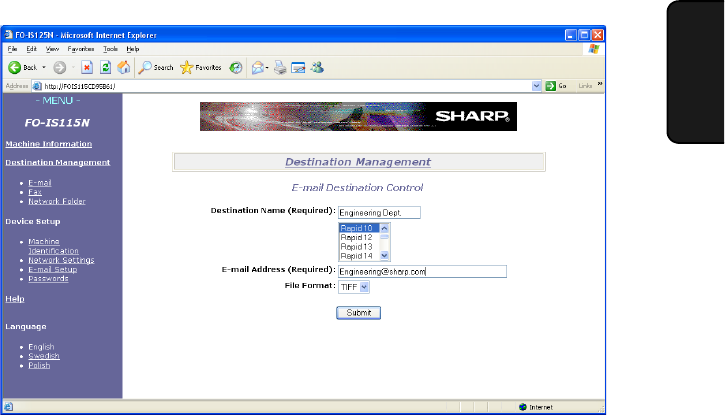
- Storing E-mail Addresses 42
- 1 Press then 44
- RESOLUTION 46
- Scan to E-mail Transmission 47
- Error messages 49
- Network Settings 50
- Scan to Folder 52
- Scan to Folder Transmission 54
- 52 g/m² 56
- Loading the Document 57
- Resolution settings 59
- Contrast settings 59
- 1 Load the document(s) 60
- 3. Sending 62
- FUNCTION 63
- 3 Press to select “FAX” 65
- 5 Press 65
- 7 Press 65
- Automatic redialling 71
- Using the REDIAL key 71
- 5 Press to exit 72
- Using MANUAL Mode 74
- Reception to Memory 75
- 5. Printing 76
- Installing the Printer Driver 77
- Removing the printer driver 77
- 5. Printing 78
- Selecting Print Settings 79
- Page Layout tab 80
- Paper tab 81
- Advanced tab 82
- 6. Making 84
- 7. Special Functions 85
- Broadcasting 86
- If the memory becomes full 86
- Blocking Unwanted Faxes 90
- Print Hold 93
- Activating Print Hold 94
- Printing received faxes 94
- Deactivating Print Hold 95
- 3 Enter the Print Hold code 96
- 4 Press 96
- FAX TO MAIL/FOLDER 97
- 7. Special 98
- Functions 98
- Printing forwarded faxes 99
- SPEED DIAL 100
- Polling (Requesting a Fax) 101
- Being polled (Memory polling) 101
- Polling security 102
- Timer Transmission 105
- 9 Press 106
- 1 Press 107
- 2 Press to select “REVIEW” 107
- 8. Option Settings 108
- Option Settings 109
- 2 Press 113
- 4 Press to print the list 113
- 2 Press 114
- 4 Press to exit 114
- Transaction Report 115
- 1 Open the operation panel 116
- ➊). Push the lever 118
- Cleaning the housing 118
- 1 Remove the paper tray 119
- Replacing the Toner Cartridge 120
- 3 Open the side cover 121
- Replacing the Drum Cartridge 122
- 11. Troubleshooting 126
- Problems and Solutions 127
- Fax reception problems 128
- Copying problems 129
- General problems 130
- Messages and Signals 131
- Audible signals 134
- Clearing Paper Jams 136
- ➋). Rotate the 136
- ➊) and open the 137
- LASER PRODUCT 164
- SHARP ELECTRONICS (NORDIC) AB 165
- SHARP CORPORATION 165
Manuais e produtos relacionados com Impressora multifunções Sharp FO-155
 (116 páginas)
(116 páginas)
(116 páginas)
 (20 páginas)
  (162 páginas)
(167 páginas)
(112 páginas)
(116 páginas)
(162 páginas)
(167 páginas)
(112 páginas)
(116 páginas)
© 2020, manymanuals-pt.com. Todos os direitos reservados. | 0.034 s |
 Manymanuals.com
 Manymanuals.de
 Manymanuals.fr
 Manymanuals.it
 Manymanuals.pl
 Manymanuals.cz
 Manymanuals.es
 Manymanuals-pt.com
Comentários a estes Manuais