Sharp AL-1566 Especificações Página 24
- Página / 116
- Índice
- MARCADORES

- DIGITAL MULTIFUNCTIONAL 1
- OPERATION MANUAL 1
- CONTENTS 3
- 6 PRINTER/SCANNER FUNCTIONS 4
- 7 USER SETTINGS 4
- 9 APPENDIX 4
- CAUTIONS 5
- Cautions on laser 6
- Trademark acknowledgements 6
- ENVIRONMENTAL INFORMATION 7
- INTRODUCTION 8
- MAIN FEATURES 9
- Laser printer function 10
- Color scanner function 10
- PREPARATIONS 11
- Operation panel 12
- MAINTENANCE" (p.71) 14
- Lock Unlock 15
- Grasp here and turn in 15
- 4 or 5 times 16
- Lock release button 16
- POWER ON AND OFF 18
- Power off 19
- Power save modes 19
- LOADING PAPER 20
- LOADING THE PAPER TRAY 21
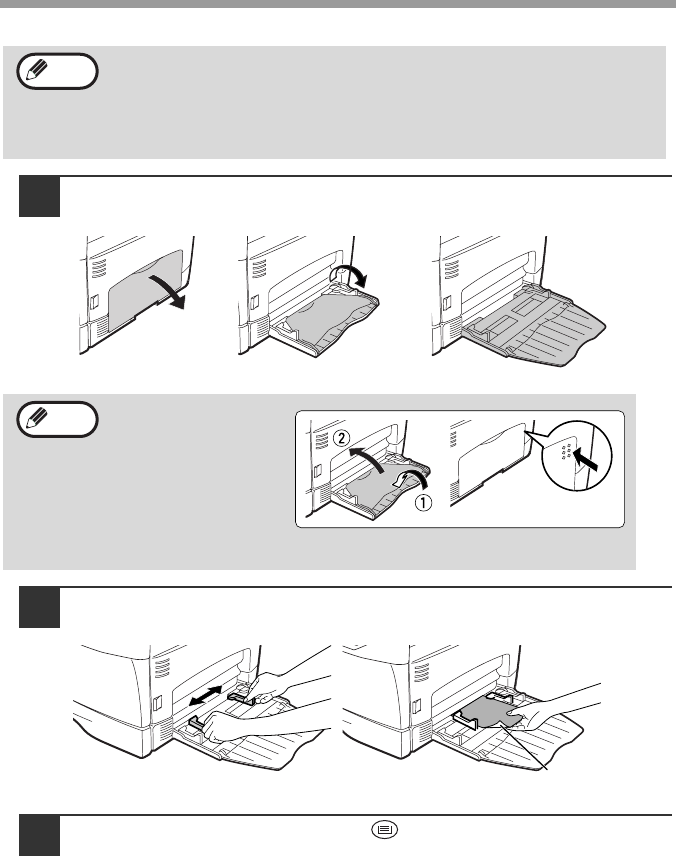
- Envelopes 23
- PAPER SIZE 25
- MAKING COPIES 26
- Using the RSPF 27
- Capacity of paper output tray 28
- SELECTING THE TRAY 29
- ()] key to select 30
- ()] key is pressed: 30
- REDUCTION/ENLARGEMENT/ZOOM 31
- CONVENIENT COPY 32
- FUNCTIONS 32
- Using the document glass 33
- SORT COPY 35
- SHEET OF PAPER (2 IN 1 copy) 37
- ORIG. SIZE ENTER 38
- CREATING MARGINS WHEN COPYING 40
- MARGIN SHIFT 41
- ON OFF 41
- LONG EDGE 41
- SET UP THE SOFTWARE 42
- BEFORE INSTALLATION 43
- INSTALLING THE SOFTWARE 44
- Connecting a USB cable 48
- If any of the entries are 53
- SETTING UP BUTTON MANAGER 57
- Windows 98/Me/2000 59
- PRINTER/SCANNER 61
- USING THE PRINTER MODE 62
- BASIC PROCEDURE FOR PRINTING 62
- USING THE SCANNER MODE 63
- SCANNING FROM YOUR COMPUTER 64
- HOW TO USE THE ONLINE MANUAL 65
- USER SETTINGS 66
- Print mode 70
- SP. FUNC 71
- Base settings 72
- TROUBLESHOOTING AND 73
- MAINTENANCE 73
- Indication 74
- Cause and remedy Page 74
- Lamp indicator Display 74
- ()] key or press the 75
- ()] key, adjust the 75
- Removing the software 81
- MISFEED REMOVAL 82
- B: Misfeed in the fusing area 83
- Roller rotating 84
- D: Misfeed in the RSPF 85
- TD CARTRIDGE REPLACEMENT 87
- DRUM CARTRIDGE REPLACEMENT 88
- CARTRIDGE LIFE 89
- CLEANING THE MACHINE 90
- Transfer charger 92
- ABOUT SUPPLIES AND OPTIONS 93
- APPENDIX 94
- Printer Function 96
- Scanner Function 97
- SOFTWARE LICENSE 98
- 6. Limited Warranty on Media 99
- 8. Limitation of Liability 99
- 10. Complete Agreement 99
- MATERIAL SAFETY DATA SHEET 100
- ()] key ............. 10, 28 108
- INDEX BY PURPOSE 111
- ➢➣➢➣➢➣➢➣➢➣➢➣➢➣ 114
- LUOKAN 1 LASERLAITE 115
- KLASS 1 LASERAPPARAT 115
- PRINTED IN FRANCE 116
Manuais e produtos relacionados com Impressora multifunções Sharp AL-1566
 (116 páginas)
 (20 páginas)
  (162 páginas)
(167 páginas)
(112 páginas)
(116 páginas)
(162 páginas)
(167 páginas)
(112 páginas)
(116 páginas)
 (108 páginas) (139 páginas)
© 2020, manymanuals-pt.com. Todos os direitos reservados. | 0.035 s |
 Manymanuals.com
 Manymanuals.de
 Manymanuals.fr
 Manymanuals.it
 Manymanuals.pl
 Manymanuals.cz
 Manymanuals.es
 Manymanuals-pt.com
Comentários a estes Manuais