Sharp AR-M257 Manual do Utilizador Página 289
- Página / 302
- Índice
- RESOLUÇÃO DE PROBLEMAS
- MARCADORES

- PURPOSE OF THE KEY OPERATOR 3
- PROGRAMS 3
- (1 999) 5
- KEY OPERATOR PROGRAM LIST 6
- KEY OPERATOR PROGRAM MENU 8
- Level 1 Level 2 Level 3 9
- GENERAL PROGRAMS 10
- ACCOUNT NUMBER CONTROL 11
- ACCOUNT LIMIT SETTING 11
- ACCOUNT NUMBER SECURITY 11
- ENERGY SAVE 12
- OPERATION SETTINGS 13
- DEVICE CONTROL 14
- Printer: Center tray 15
- KEY OPERATOR CODE 16
- PRODUCT KEY 16
- PROGRAMS FOR COPY MODE 17
- PROGRAMS FOR PRINT MODE 18
- INTERFACE SETTINGS 19
- NETWORK SETTINGS 20
- PROGRAMS FOR NETWORK 22
- SCANNER MODE 22
- AR-M257/AR-M317 24
- FOR YOUR RECORDS 26
- 7 APPENDIX 28
- CAUTIONS 29
- 12" (30cm) 30
- 12" 30
- USING THE MANUAL 31
- INDICATIONS 32
- MAIN FEATURES 33
- BEFORE USING THE MACHINE 34
- Interior 35
- OPERATION PANEL 36
- TOUCH PANEL 37
- 4 5 6 7 8 38
- POWER ON AND OFF 39
- INITIAL SETTINGS 40
- POWER SAVE MODES 40
- LOADING PAPER 41
- Special papers 42
- Landscape 44
- Portrait 44
- SETTINGS 45
- From the [PAPER SELECT] key 46
- COPY FUNCTIONS 47
- NORMAL COPYING 48
- COPYING FROM THE RSPF 49
- Document glass and RSPF 50
- () to indicate 51
- BYPASS FEED (special paper) 52
- AUTOMATIC TWO-SIDED COPYING 53
- USING THE RSPF 54
- EXPOSURE ADJUSTMENT 55
- REDUCTION/ENLARGEMENT/ZOOM 56
- MANUAL RATIO SELECTION 57
- EXPOSURE 58
- AUTO 8½x11 58
- PAPER SELECT 58
- X-50% Y-70% 59
- INTERRUPTING A COPY RUN 60
- CONVENIENT COPY FUNCTIONS 61
- 2-SIDED COPY 62
- STAPLE SORT 63
- POSITIONS 63
- SPECIAL MODES 65
- FUNCTIONS 66
- MARGIN SHIFT COPY 67
- ERASE COPY 68
- DUAL PAGE COPY 69
- PAMPHLET COPY 70
- JOB BUILD MODE 71
- MULTI SHOT COPY 72
- ORIGINAL SIZE 73
- COVER COPY 74
- PRINT ON FRONT COVER? 75
- B/W REVERSE COPY 76
- CARD SHOT 77
- USER SETTINGS 79
- B STATUS 80
- CUSTOM SETTINGS 80
- STORING A JOB PROGRAM 82
- EXECUTING A JOB PROGRAM 83
- DELETING A STORED JOB PROGRAM 83
- ASSISTANCE 84
- Chapter 5 85
- Paper feeding problems 90
- Image quality problems 91
- MISFEED REMOVAL 92
- INFORMATION 92
- MISFEED IN THE RSPF 93
- MISFEED IN THE BYPASS TRAY 94
- MISFEED IN THE MACHINE 94
- Roller rotating knob 95
- Fusing unit release levers 95
- MISFEED IN THE CENTER TRAY 96
- A MISFEED HAS OCCURRED 98
- Make sure that the 99
- REPLACING THE TONER CARTRIDGE 100
- STAPLE CARTRIDGE REPLACEMENT 101
- CHECKING THE TONER QUANTITY 102
- AND TOTAL COUNT 102
- CLEANING THE MACHINE 103
- PERIPHERAL DEVICES 104
- FINISHER (AR-FN5A) 105
- 2 x 500-SHEET PAPER FEED UNIT 106
- 500-SHEET PAPER FEED UNIT/ 106
- STORAGE OF SUPPLIES 107
- APPENDIX 108
- MATERIAL SAFETY DATA SHEET 110
- 10. STABILITY AND REACTIVITY 112
- 11. TOXICOLOGICAL INFORMATION 112
- 12. ECOLOGICAL INFORMATION 113
- 13. DISPOSAL CONSIDERATIONS 113
- 14. TRANSPORT INFORMATION 113
- 15. REGULATORY INFORMATION 113
- 16. OTHER INFORMATION 113
- INDEX BY PURPOSE 121
- Trademark acknowledgments 122
- Connectors 126
- NOTICE for users in the USA 127
- AR-M257/AR-M317 (for copier) 128
- Warranty 130
- INTRODUCTION 131
- TROUBLESHOOTING 132
- METADATA DELIVERY 132
- SPECIFICATIONS 132
- ABOUT THE NETWORK SCANNER 133
- FUNCTION 133
- SETTINGS AND PROGRAMMING 134
- REQUIRED FOR THE NETWORK 134
- SCANNER FEATURE 134
- ABOUT THE WEB PAGE 135
- USING AN LDAP SERVER) 138
- Click here 140
- Click "FTP" 141
- Click "Group" 143
- Condition settings screen 148
- Address book screen 149
- SENDING AN IMAGE 150
- READ-END 151
- CANCEL OK 152
- ADDRESS ENTRY 153
- ADDRESS REVIEW 153
- SEND SETTINGS 153
- SCANNING SETTINGS 156
- SELECTING THE QUALITY 157
- SELECTING THE RESOLUTION 158
- SELECTING THE FILE FORMAT 159
- CHANGING THE SEND SETTINGS 160
- CANCELING AN E-MAIL/FTP 161
- TRANSMISSION 161
- DISPLAY MESSAGES 163
- IF YOUR E-MAIL IS RETURNED 164
- Original image samples 165
- CHECKING THE IP ADDRESS 166
- PREPARATIONS FOR METADATA 168
- TRANSMITTING METADATA 169
- METADATA FIELDS 171
- SHARP ELECTRONICS CORPORATION 176
- Introduction 178
- How to use the online manual 179
- Contents 180
- Basic printing 183
- CONTENTS 187
- Printer driver settings 188
- Two-sided printing 189
- Printing a watermark 194
- (part 1) 195
- (part 2) 196
- Print hold function 197
- (part 3) 200
- Carbon copy print 201
- Printer utilities 204
- Using the printer utilities 205
- (1) (2) (3) 220
- (part 4) 235
- (part 5) 236
- (part 6) 237
- (part 7) 238
- (part 8) 239
- Troubleshooting 241
- Printing does not take place 242
- Improper printing operation 246
- If a notice page is printed 250
- Removing the software 252
- About the Web page 254
- E-mail print function 258
- Printer specifications 264
- Printer driver specifications 265
- Online Manual 268
- Canceling a print job 285
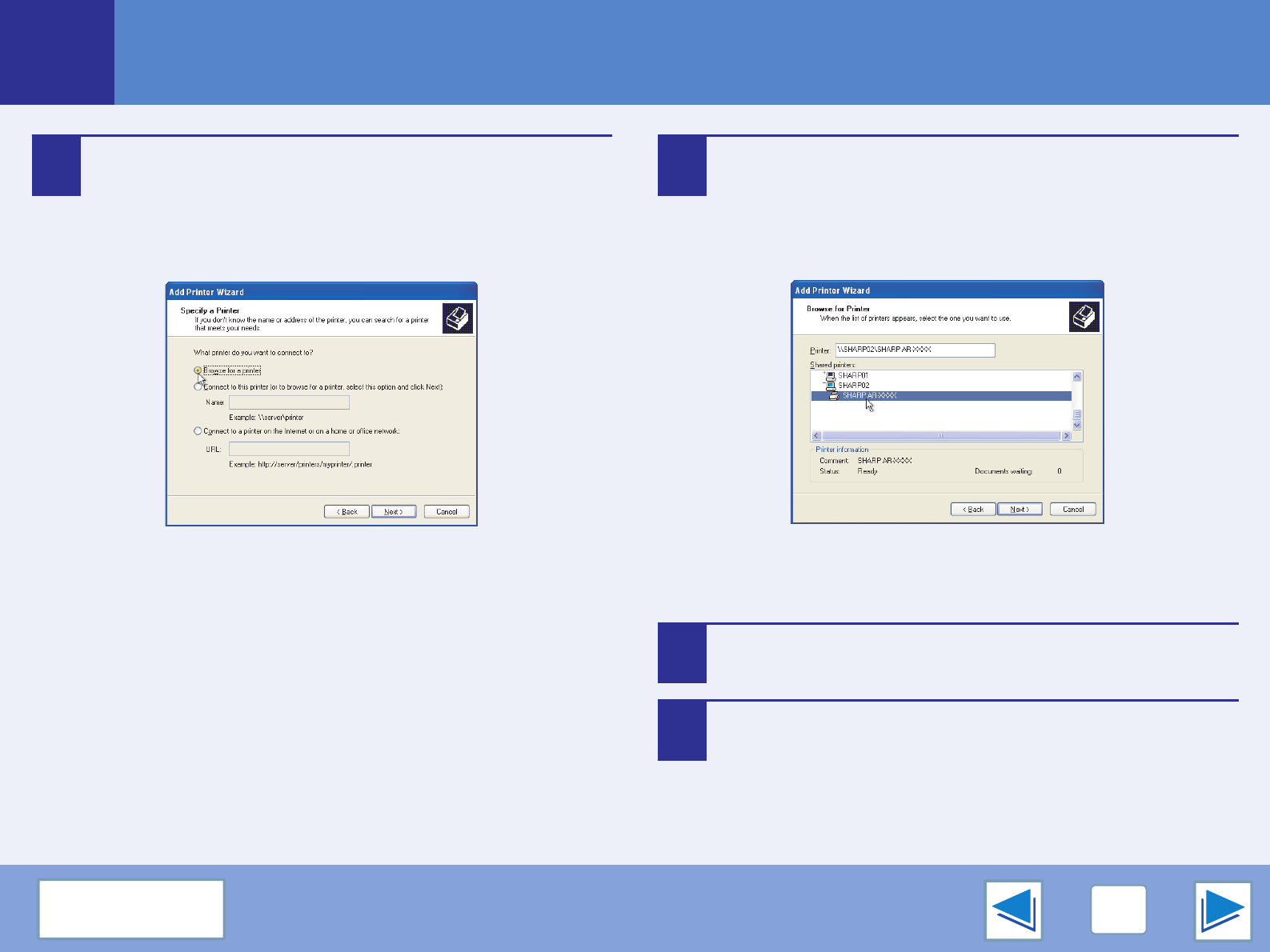
- Shared printer settings 287
- Client settings 288
- If a Notice Page is printed 300
Manuais e produtos relacionados com Dispositivos multifunções Sharp AR-M257
 (2 páginas)

 (40 páginas)
 (10 páginas)
© 2020, manymanuals-pt.com. Todos os direitos reservados. | 0.047 s |
 Manymanuals.com
 Manymanuals.de
 Manymanuals.fr
 Manymanuals.it
 Manymanuals.pl
 Manymanuals.cz
 Manymanuals.es
 Manymanuals-pt.com
Comentários a estes Manuais