Sharp DM007SH Especificações Página 64
- Página / 388
- Índice
- RESOLUÇÃO DE PROBLEMAS
- MARCADORES

- Introduction 1
- Chapter Contents 2
- At A Glance 2
- Guide Usage Notes 3
- Table of Contents 4
- Accessory 6
- Handset, Battery, USIM Card 8
- Memory Card (Sold Separately) 8
- [ Mobile Light LED Properties 10
- Charger (Sold Separately) 11
- Handset Use & Electronic 12
- Medical Equipment 12
- General Notes 13
- Bluetooth 14
- Mobile Camera 14
- In-Call/Transmission Caution 14
- Electromagnetic Waves 15
- CE Declaration of Conformity 15
- FCC Notice 15
- FCC RF Exposure Information 16
- Portrait Rights 17
- Copyrights 17
- Safety Precautions 18
- Getting Started 21
- Parts & Functions 22
- Handset Keys 23
- Charging Battery 24
- USB Charge 25
- In-Car Charger 25
- Handset Power On/Off 26
- 1' (Long) 27
- 1With handset closed, I 28
- Indicators 29
- [ Transmissions 30
- [ Settings 30
- Basic Operations 31
- Accessing Functions 32
- 2e Select menu item S % 33
- 1& (Long) 34
- 2Simple Menu S % 34
- Shortcuts Menu 35
- Key Shortcut 35
- 1In a function window, ' 36
- 2Select function S % 36
- 4" S Multi Job ends 36
- Standby Shortcuts 37
- Motion Control 38
- 2Motion Control S % 39
- 3Action Settings S % 39
- 4Select function S % 39
- Illumi Display 40
- 1In Illumi Display menu 41
- 2Select item S % S Pattern 41
- 3Preset Pattern S % S 41
- 2Select item S % (/) S 41
- 1) (Long) 42
- 2Offline Mode S % 42
- Security Codes 43
- My Details & Basic Tools 44
- Mode Settings 46
- My Details 46
- 7% S Settings S % S In Sound/ 47
- Customizing Fonts 49
- Wallpaper 50
- Customized Screen (Japanese) 51
- Customizing Handset Responses 52
- 2Select mode S % 53
- Entering Characters 54
- Text Entry 55
- Emoticons 56
- Mail & Web Extensions 56
- Hiragana to Katakana/ 56
- Alphanumeric Conversion 56
- Editing Characters 57
- 2New Entry S % S Enter 58
- 3Enter reading S % 58
- 1In User Dictionary menu 58
- 2Select number S % S 58
- Using Dictionaries (Japanese) 59
- Using Online Dictionaries 60
- Using History & Bookmarks 61
- Searching Text 62
- 2Scratch Pad S % 63
- 3Enter text S % 63
- 4Save to Notepad S % 63
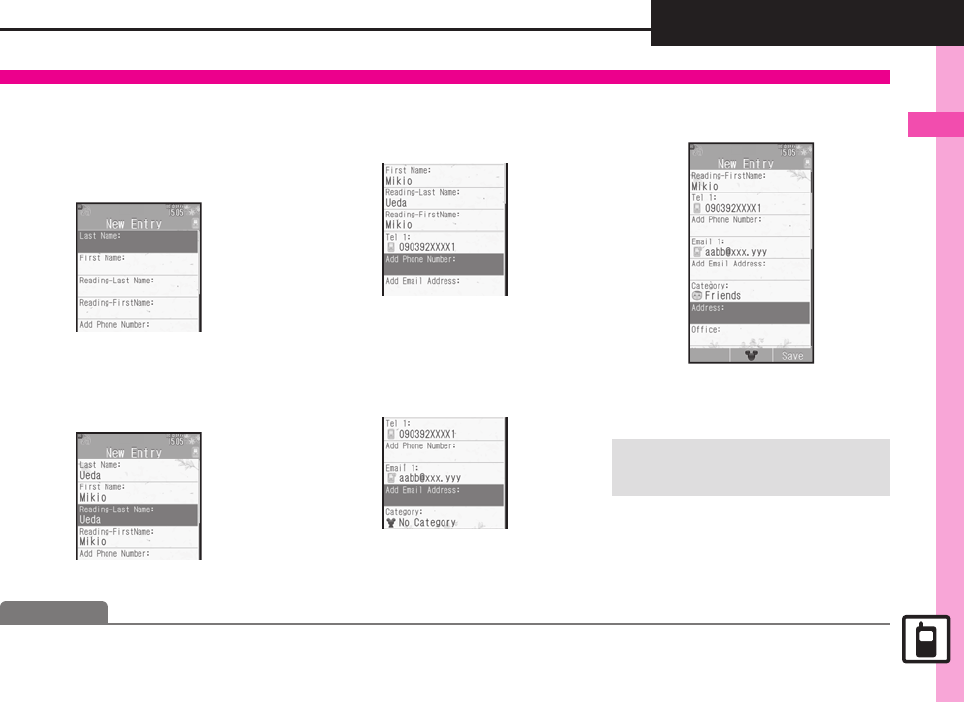
- Creating Phone Book Entries 64
- Personal Ringtone 65
- Saving Secret Entries 65
- Saving Numbers After Calls 65
- Using Phone Book Entries 66
- User Dictionary 68
- Dictionary 68
- Phone Book 69
- [ Using Entries 70
- [ Managing Entries 71
- Emergency Calls 74
- Voice Calling 75
- Answer Phone 76
- 1! to accept the call 77
- 2" S Call ends 77
- 1Enter phone number S % 77
- 2Video Call S % 77
- 3" S Call ends 77
- Speed Dial 78
- 2Select record S % 79
- 3Call Timers S % 80
- 4Dialed Calls or Received 80
- Restrict Destinations 81
- Reject Numbers 82
- Optional Services 83
- Initiating Voicemail 84
- Canceling Call Forwarding/ 84
- Voicemail 84
- 7% S Settings S % S f Call S 85
- Placing a Call 86
- During a Call 87
- Call Log 88
- 7% S Phone S % S Touch-Tone 91
- Customizing Handset Address 96
- Sending E Mail 97
- Attaching Files 98
- Sending Feeling Mail 98
- Sending Graphic Mail 99
- Using My Pictograms 100
- メールアニメーションを作る 101
- メール絵文字を作る 101
- メールテンプレートを作る 102
- Sending SMS 103
- Restricting Outgoing Messages 104
- 2Select message S % 105
- 1Message S % 105
- 1In message window, A 106
- 2Complete message S A 106
- Customizing E Mail Retrieval 107
- 1B S Received Msg. or 108
- 2Select folder S % 108
- 3Select message S % 108
- 1In message list, select 108
- 2Lock S % 108
- Searching Messages 109
- Hiding Folders 109
- Sorting Messages 110
- Using Chat Folders 111
- 1B S Disney Mail Viewer 112
- 2Yes S % 112
- Mail Groups 113
- Messaging 114
- PC Mail Account Setup 115
- Retrieving New PC Mail 116
- Checking Received PC Mail 116
- Replying to PC Mail 116
- Sending PC Mail 116
- Additional Functions 117
- [ Messaging Settings 118
- [ Attachments 119
- [ Graphic Mail 119
- [ My Pictograms 120
- Receiving/Opening Messages 121
- 7B S Settings S % S General 123
- Managing Messages 124
- [ Folders 125
- [ Sorting into Folders 126
- [ Chat Folder 126
- [ Mail Groups 126
- Using Messages 127
- PC Mail Settings 131
- SMS Settings 133
- Troubleshooting 134
- Incoming Messages 135
- Handling Messages 135
- Internet 136
- Service Basics 137
- Using Disney Web 138
- 1On a page, select file S % 139
- 1% S Disney Web S % 140
- 2PC Site Browser S % 140
- 3Homepage S % S 140
- 4Highlight menu item S % 140
- 5" S Yes S % S Page 140
- 2Open in New Tab S % 141
- 1( (Long) S f Select tab 141
- Selecting Text 142
- Additional Page Operations 142
- Bookmarks & Saved Pages 143
- Updating Blogs & News 144
- 7On a page, B S Convenient 146
- Internet Page Settings 147
- [ Disney Web 148
- [ PC Site Browser 148
- [ General 148
- [ Streaming 148
- Bookmarks 149
- 7% S Disney Web S % S Saved 150
- Security Settings 151
- Resetting 152
- Digital TV 154
- 3Select region S % 156
- 4Select prefecture S % S 156
- Watching TV 157
- Advanced 158
- 1In TV window, I 159
- 1In TV window, 1 - 9 159
- 1In TV window, A (Long) 160
- 1In TV window, B S 160
- 2Program Info. S % 160
- 3Select program S % 160
- 1In TV window, % (Long) S 161
- 2% (Long) S Recording 161
- 2Select file S % 162
- 3A (Long) S Playback 162
- 1In TV window, B S TV 162
- TV Timer 163
- 1While watching TV, & 164
- 7While watching TV, B S 167
- Subtitle & Sound 168
- Recording 168
- Recorded Programs 169
- 7During playback S See below 170
- Camera & Imaging 173
- Detect Personal 174
- Select Camera 174
- Continuous AF 174
- are fixed 175
- 177
- 4" S Camera shuts down 177
- 1In Photo Viewfinder, frame 179
- Selecting Camera by Use 180
- Photo Camera 181
- [ Panorama Camera 182
- [ Self Portrait Camera 182
- [ Additional Cameras 182
- Image Size 183
- Save Settings 184
- Conditions 184
- Saving Entries 186
- Recording Video 188
- Video Camera 189
- 190
- 1In Review window, A 190
- Picture Editor 191
- Changing Image Size 192
- Applying Visual Effects 192
- Adding Frames 192
- Face Arrange 193
- Composite 194
- Printing Images 195
- [ Correction & Preview 198
- [ My Camera 198
- Editing Images 200
- Photo Camera Terms 202
- Media Player 203
- Media Player Basics 204
- 1% S Media Player S % S 206
- 2My Music S % S f Select 206
- 3All Music S % 206
- 4Select file S % 206
- 2My Videos S % S Phone 207
- 3All Videos S % 207
- 5$ S Playback stops 207
- Using Playlists 208
- Managing Music Files 210
- Managing Video Files 211
- S! Applications & 213
- 1% S S! Appli S % 214
- 2S! Appli Library S % 214
- 3Select application S % 214
- 2End S % 214
- 1% S Widget S % 215
- 2Widget Store S % 215
- 1In Mobile Widget menu 215
- 2Select widget S B 215
- 3Delete S % S Yes S % 215
- Widget Tab 216
- Standby Shortcut Tab 216
- S!速報ニュース/ 217
- S!ともだち状況 217
- 7% S S! Appli S % S See below 218
- S! Applications & Widgets 219
- S!速報ニュース/S!ともだち 220
- [ Sheets 221
- Handy Extras 223
- 1% S Tools S % S In PIM/ 224
- Saving Schedules 225
- 1In Calendar window, select 226
- 2Select schedule or task 226
- 3" S Standby returns 226
- 1In schedule list, select 226
- 2B S Related Mail S % 226
- Information Link 227
- Deleting Schedules 227
- Saving Tasks 228
- Opening Tasks 229
- Deleting Tasks 229
- Using Alarms 230
- At Alarm Time 231
- Canceling Alarm 231
- Deleting Alarm 231
- Using Wakeup TV 232
- At Wakeup TV Time 233
- Canceling Wakeup TV 233
- Deleting Wakeup TV 233
- Luxury Animation 234
- Managing Household Expenses 235
- Entering Manually 236
- Changing Settings 237
- 1In Household Accounts 238
- 2Select date S % 238
- 3Select entry S % 238
- 2Results by Month S % 238
- 2Use Keypad to enter digits 239
- Adding Expenses 240
- Osaifu-Keitai 241
- (Japanese) 241
- 2IC Card Settings S % 242
- 3IC Card Lock S % S On 242
- 4Enter Handset Code S % 242
- Remote Lock 243
- Faking Incoming Calls 245
- 1% S Tools S % S f 246
- 2% S Stopwatch starts 246
- 3% S Stopwatch stops 246
- 4" S Yes S % S 246
- Using Countdown Timer 247
- Opening World Clock 248
- Using Hour Minder 249
- Using Pedometer 250
- Viewing Step Count Records 251
- Setting Targets 251
- 2Navi Appli S % 253
- 3Yes S % 253
- Opening Location Log 254
- Pinpointing Current Location 254
- Using My Location 254
- 1In S! GPS Navi menu 255
- 1Location Information 255
- 2B (provide) or A (reject) 255
- Saving Text 257
- Recording/Playing Voice 258
- 2Scan Barcode S % 259
- 3Frame barcode in center of 259
- 4% S Scan starts 259
- 5Tone sounds S Scan results 259
- 2Create QR Code S % 260
- 3Data Folder S % 260
- 4Select folder S % S Select 260
- Scanning Business Cards 261
- Scanning Text 262
- Using Kanji Grabber 263
- [ Saving/Editing Schedules 265
- [ Managing Schedules 266
- [ Task List 267
- [ Saving/Editing Tasks 267
- [ Managing Tasks 268
- Wakeup TV 269
- Household Accounts 270
- Calculator 271
- Expenses Memo 271
- Simulated Call 272
- Countdown Timer 272
- Hour Minder 273
- Pedometer 274
- S! GPS Navi 274
- Voice Recorder 276
- Scan Barcode 276
- Scan Card 278
- Scan Text 279
- Kanji Grabber 280
- Entertainment 282
- 1% S Entertainment S % 283
- S! Quick News 284
- 2Registration/Cancel S % 285
- 1While Information window 285
- 2" S Standby returns 285
- 2Music Store S % 286
- 2e-Book Viewer S % 287
- 1In Entertainment menu 287
- Using S! Friend's Status 288
- Opening Member Status 289
- Changing My Status 289
- <未定> 290
- Using S! Circle Talk 291
- Initiating S! Circle Talk 292
- Blogging 293
- Posting to Blogs 294
- Opening Blog Page 294
- 文字列をコピー 296
- S! Friend's Status 297
- S! Circle Talk 298
- Blog Tool 298
- Handset Security 300
- 1% S Settings S % S f 301
- 2Function Lock S % 301
- 3Select option S % S Enter 301
- 1In Locks menu, PIN Entry S 301
- 2On S % S Enter PIN S % 301
- Information Security 302
- Using Face Recognition 303
- Scanning Face 304
- Activating & Canceling 304
- 2Function Control S % 305
- Data Folder & 307
- Memory Card 307
- Data Folder 308
- Opening Files 309
- Managing Files & Folders 310
- 1Remove Battery Cover 311
- 2Insert card 311
- 3Close Battery Cover 311
- Format Card 312
- Opening Memory Card Files 312
- Using Files/Folders 314
- Managing Files/Folders 314
- 7% S Data Folder S % S Other 315
- Connectivity & 317
- File Backup 317
- Infrared 318
- 1d (Long) 319
- 2Connection request arrives 319
- 3Perform subsequent 319
- Sending Files 320
- 1b (Long) 321
- 2Receive S % 321
- 3Profile received 321
- 1In Exchange Profile menu 321
- IC Transmission 322
- Receiving Files 323
- 0(Activating Bluetooth 325
- 1In Bluetooth menu, Paired 326
- 2Select device S % 326
- 1Connection request arrives 326
- Transferring Files 327
- External Device Connection 328
- Supported Items 329
- Precautions 329
- Backup & Restore 330
- About SAB 331
- Service Usage Outline 332
- Using Sync Commands 333
- [ Bluetooth 335
- Watches 335
- [ Paired Devices 335
- [ Sending Files 335
- S!電話帳バックアップ 336
- 編集用パスワード確認 336
- Handset 339
- Customization 339
- Date & Time Settings 340
- Display & Illumination 341
- 7% S Settings S % S f Phone/G 342
- Incoming Transmissions 343
- Sound Settings 344
- 7% S Settings S % S f Network 345
- Reset Settings 346
- Appendix 347
- About USIM Card 348
- USIM Card Installation 349
- 2Insert battery 350
- 2Software Update S % 351
- [ Charger/Battery 353
- Text Entry Key Assignments 354
- Pager Code List 356
- Character Code List 357
- Weather Indicator List 363
- Specifications 364
- Universal Operations, Etc 365
- Reference URLs 368
- Menu List 370
- [ Settings: PC Mail Settings 371
- [ Settings: SMS Settings 371
- S! Appli 373
- Settings 375
- Warranty & Service 386
- Customer Service 387
- Model: Disney Mobile DM007SH 388
Manuais e produtos relacionados com Telemóveis Sharp DM007SH
 (4 páginas)
(215 páginas)
(402 páginas)
(128 páginas)
(132 páginas)
(7 páginas)
(166 páginas)
(107 páginas)
(1 páginas)
(13 páginas)
(162 páginas)
(156 páginas)
(156 páginas)
(132 páginas)
(155 páginas)
(87 páginas)
(448 páginas)
(171 páginas)
(240 páginas)
(4 páginas)
(215 páginas)
(402 páginas)
(128 páginas)
(132 páginas)
(7 páginas)
(166 páginas)
(107 páginas)
(1 páginas)
(13 páginas)
(162 páginas)
(156 páginas)
(156 páginas)
(132 páginas)
(155 páginas)
(87 páginas)
(448 páginas)
(171 páginas)
(240 páginas)
© 2020, manymanuals-pt.com. Todos os direitos reservados. | 0.075 s |
 Manymanuals.com
 Manymanuals.de
 Manymanuals.fr
 Manymanuals.it
 Manymanuals.pl
 Manymanuals.cz
 Manymanuals.es
 Manymanuals-pt.com
Comentários a estes Manuais