Sharp R-1750 Especificações Página 29
- Página / 40
- Índice
- MARCADORES

- CONTENTS 2
- TO EXCESSIVE MICROWAVE ENERGY 2
- FOR CUSTOMER ASSISTANCE 2
- PRODUCT INFORMATION CARD 4
- CONSUMER LIMITED WARRANTY 4
- IMPORTANT SAFETY INSTRUCTIONS 5
- UNPACKING INSTRUCTIONS 6
- GROUNDING INSTRUCTIONS 6
- OPTIONAL ACCESSORIES 6
- INFORMATION YOU NEED TO KNOW 7
- PART NAMES 10
- TOUCH SCREEN CONTROL PANEL 11
- INTRODUCTION TO TOUCH SCREEN 12
- BEFORE OPERATING 13
- MANUAL OPERATION 14
- HIGH POWER COOKING 14
- MULTIPLE SEQUENCE COOKING 15
- VARIABLE POWER COOKING 15
- ONE TOUCH SENSOR 16
- 6x6 NO GUESS COOKING 18
- MORE FROM YOUR MICROWAVE 6x6 20
- RECIPES FOR ONE DISH DINNERS 22
- DEFROST 3+6 26
- SUPER DEFROST CHART 26
- COMPU DEFROST CHART 27
- KEEP WARM 28
- BEVERAGE CENTER 28
- BEVERAGE CENTER CHART 28
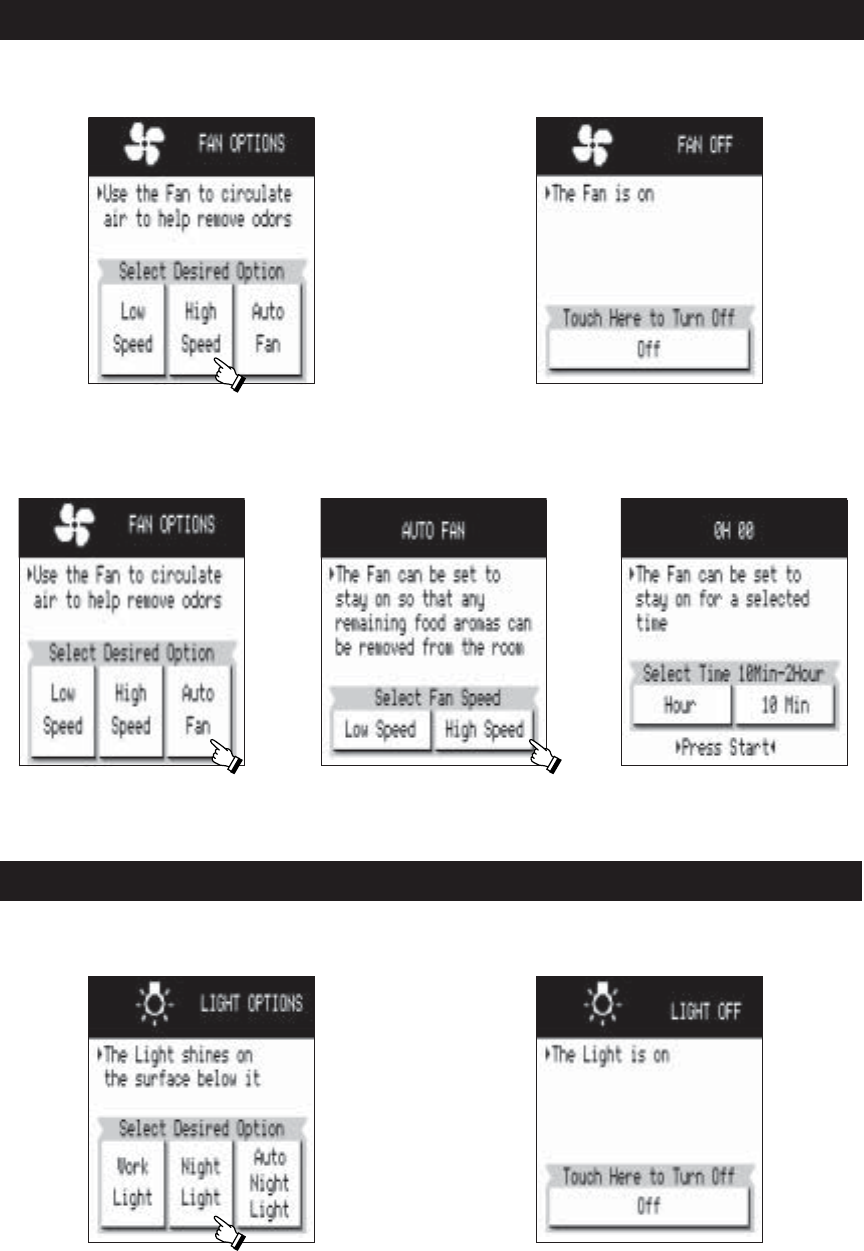
- FAN OPTIONS 29
- LIGHT OPTIONS 29
- TURNTABLE ON/OFF 30
- 2.AUTO START 31
- OTHER CONVENIENT FEATURES 32
- Grease filter 35
- OVEN LIGHT 36
- REPLACING PARTS 36
- WORK LIGHT AND 36
- NIGHT LIGHT 36
- CHARCOAL FILTER 36
- SERVICE CALL CHECK 38
- QUICK REFERENCE 39
- SHARP ELECTRONICS CORPORATION 40
Manuais e produtos relacionados com Micro-ondas Sharp R-1750
 (24 páginas)
(166 páginas)
(8 páginas)
(74 páginas)
(24 páginas)
(166 páginas)
(8 páginas)
(74 páginas)
 (160 páginas)
(40 páginas)
(43 páginas)
(27 páginas)
(18 páginas)
(12 páginas)
(108 páginas)
(24 páginas)
(16 páginas)
(15 páginas)
(5 páginas)
(13 páginas)
(24 páginas)
(53 páginas)
(47 páginas)
(43 páginas)
(160 páginas)
(40 páginas)
(43 páginas)
(27 páginas)
(18 páginas)
(12 páginas)
(108 páginas)
(24 páginas)
(16 páginas)
(15 páginas)
(5 páginas)
(13 páginas)
(24 páginas)
(53 páginas)
(47 páginas)
(43 páginas)
© 2020, manymanuals-pt.com. Todos os direitos reservados. | 0.028 s |
 Manymanuals.com
 Manymanuals.de
 Manymanuals.fr
 Manymanuals.it
 Manymanuals.pl
 Manymanuals.cz
 Manymanuals.es
 Manymanuals-pt.com
Comentários a estes Manuais