Sharp FO-150 Especificações Página 68
- Página / 83
- Índice
- RESOLUÇÃO DE PROBLEMAS
- MARCADORES

- FACSIMILE 1
- WARRANTY 2
- Introduction 3
- Important safety information 5
- Table of Contents 7
- A Look at the Operation Panel 9
- 1. Installation 11
- Connections 12
- 1 Press once and once 13
- 2 Press once and 3 times 13
- 3 Press once 13
- 4 Select the dial mode: 13
- 5 Press to exit 13
- Extension phone (optional) 15
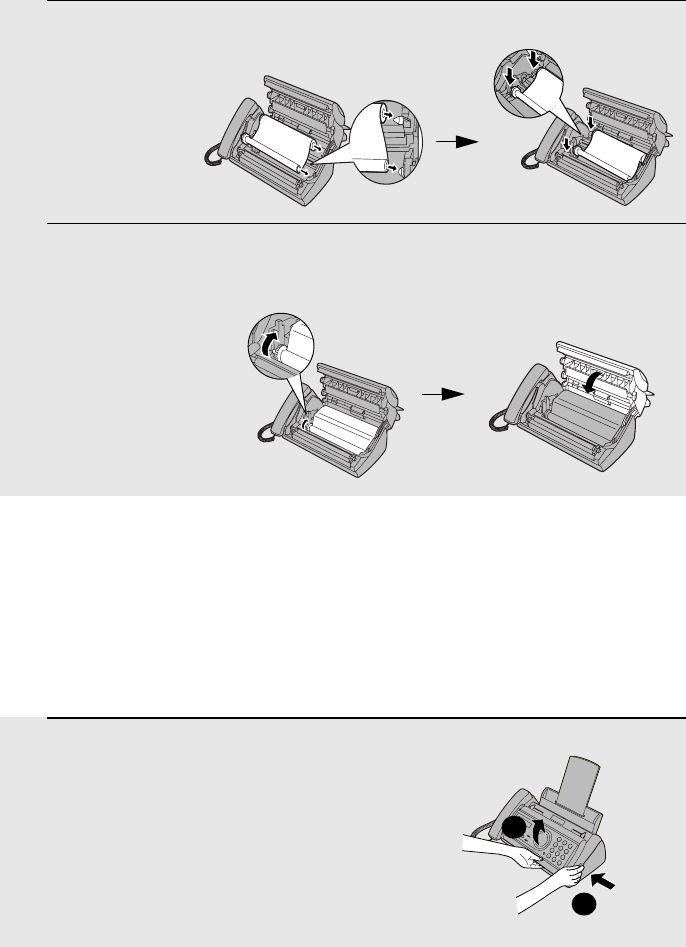
- Loading the Imaging Film 16
- 5 Insert the green gears 17
- Loading Printing Paper 18
- OPTION SETTING 19
- PRINT CONTRAST 19
- COPY CUT-OFF 19
- 1:NORMAL 19
- 1 Press once and twice 20
- 2 Press once 20
- 7 Press 21
- Setting the Date and Time 22
- 8 Press to start the clock 23
- Setting the Reception Mode 24
- Volume Adjustment 25
- START/MEMORY 26
- RINGER: HIGH 26
- RINGER: MIDDLE 26
- RINGER: LOW 26
- RINGER: OFF OK ? 26
- 2. Sending Faxes 27
- Loading the Document 28
- Resolution settings 29
- 1 Load the document(s) 30
- READY TO SEND 31
- ENTER FAX # 32
- <NEW NUMBER> 32
- 6 Press 33
- 1=EDIT, 2=CLEAR 34
- Memory transmission 39
- If the memory becomes full 39
- Using A.M. Mode 41
- Using TEL Mode 43
- RECEIVING 44
- FAX SIGNAL RX 45
- Optional Reception Settings 46
- RECEIVE RATIO 47
- 1=AUTO, 2=100% 47
- RATIO: 125% 49
- NUMBER OF RING 50
- 1=YES, 2=NO 50
- 5. Answering 51
- Changing the outgoing message 52
- Optional A.M. Mode Settings 53
- 2 Press once and 5 times 54
- 2 Press once and 7 times 55
- ENTER (00-15) 05 56
- ON A.M. FAILURE 56
- 6. Special Functions 57
- JOHN DOE 525-8693 58
- <REVIEW CALLS> 59
- Priority Call 60
- Blocking voice calls 61
- DISTINCTIVE 62
- 6. Special 63
- Functions 63
- LISTING MODE 64
- TEL # LIST 64
- PRESS START KEY 64
- Caller-ID List 65
- Transaction Report 65
- TRANSACTION 66
- DIAL MODE 66
- 1:ALWAYS PRINT 66
- 8. Maintenance 67
- Scanning glass and rollers 68
- The housing 69
- 9. Troubleshooting 70
- Problems and Solutions 71
- Answering machine connection 73
- General problems 74
- Messages and Signals 75
- Audible signals 77
- Clearing Paper Jams 79
- Quick Reference Guide 80
- SHARP CORPORATION 83
Manuais e produtos relacionados com Máquinas de fax Sharp FO-150
 (151 páginas)
(4 páginas)
(198 páginas)
(107 páginas)
(147 páginas)
(111 páginas)
(14 páginas)
(151 páginas)
(4 páginas)
(198 páginas)
(107 páginas)
(147 páginas)
(111 páginas)
(14 páginas)
 (84 páginas)
(93 páginas)
(87 páginas)
(103 páginas)
(131 páginas)
(131 páginas)
(115 páginas)
(74 páginas)
(84 páginas)
(93 páginas)
(87 páginas)
(103 páginas)
(131 páginas)
(131 páginas)
(115 páginas)
(74 páginas)
 (166 páginas)
(118 páginas)
(166 páginas)
(118 páginas)
© 2020, manymanuals-pt.com. Todos os direitos reservados. | 0.041 s |
 Manymanuals.com
 Manymanuals.de
 Manymanuals.fr
 Manymanuals.it
 Manymanuals.pl
 Manymanuals.cz
 Manymanuals.es
 Manymanuals-pt.com
Comentários a estes Manuais