Sharp XG-SV200X Ficha Técnica Página 2

  • Descarregar
  • Adicionar aos meus manuais
  • Imprimir
  • Página
    / 4
  • Índice
  • MARCADORES
  • Avaliado. / 5. Com base em avaliações de clientes
Vista de página 1
Integrated Ceiling Swivel Mount Option Enables One Sharp Projector to Take
The Place of What May Have Previously Required Two or More Projectors
High Brightness
Sharp’s advanced optoelectronics technology helps maximize light output
providing exceptionally clear images with a high brightness of 5000 lumens
(XG-SV200X) and 4500 lumens (XG-SV100W).
3D Ready
Make sure your projector is ready for use with new 3D content. Incorporating
DLP Link technology, when used with compatible 3D field sequential content
and PC, and optional 3D shutter glasses that support the DLP link system,
these models captivate audiences with breathtaking 3D imagery.
BrilliantColor™ DLP Technology with
Five-Segment Color Wheel
BrilliantColor technology combined with a Sharp designed 2x speed, 5-segment
color wheel help provide superior color accuracy with more realistic image
reproduction. Incorporating segments for red, green, blue,
white and yellow, these color wheels in combination with
Sharp’s unique color matching technology, assist in
ensuring brilliant full-color images.
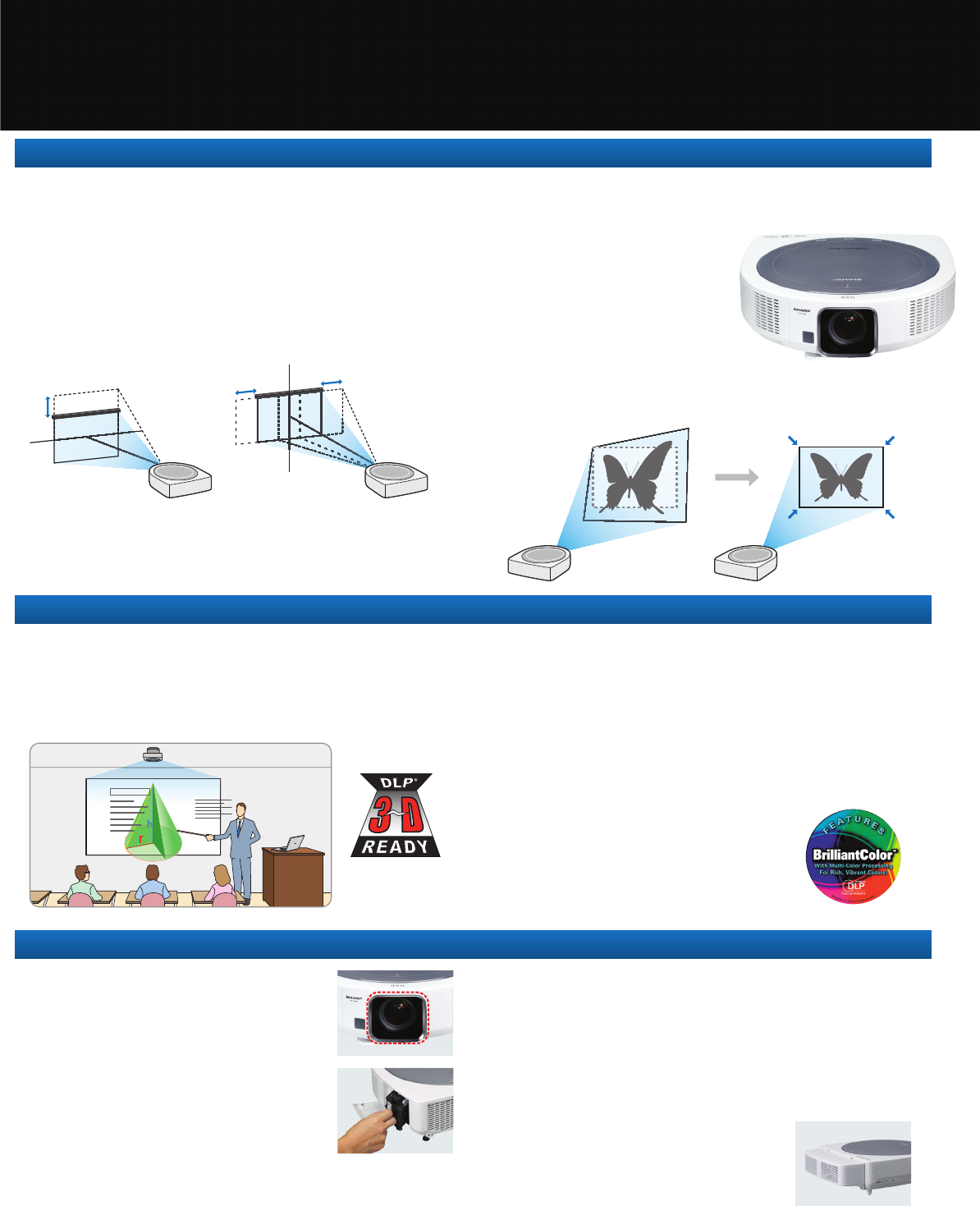
Flexible Installation
Adjustable range
Adjustable range
Adjustable range
3D Ready with DLP
®
Link™ Technology
Sealed DLP Chip with Filter-Free Design
This helps ensure lower maintenance and operating costs.
Sharp’s Proprietary Safe Lamp
Housing Structure
A unique internal shutter door on the lamp housing helps
keep glass confined in the event of lamp breakage.
Lens Protection Cover
The lens protection cover helps protect the lens from
dust and damage when the projector is not being used.
Easy Lamp Replacement
Front of projector lamp access helps ensure easy
and safe lamp replacement even when the projector
is ceiling mounted.
Enhanced Anti-Theft Design
This includes LAN monitor function, reinforced metal security bar, Kensington™
lock compatibility and optional security cable kits (for use with Sharp AN-XGCM55
optional ceiling mount bracket).
Terminal Cover
By attaching the included terminal cover, cables
connected to the projector are concealed, helping
maintain a clean look when the projector is used
in a ceiling mount installation.
Reliable Performance
Center Lens Design
The center lens design makes it easier to install and adjust projectors in
fixed installations.
Powered H&V Lens Shift with Wide-Range
Motorized 2.0x Zoom Lens
This enables exceptionally wide projector placement with easier setup. When
combined with the AN-SV100T optional rotating ceiling swivel mount unit, this
permits one projector to automatically rotate horizontally and project, one at a time,
on multiple screens.
Automatic Geometric Keystone Adjustment with
Eight Presets
These projectors include eight memory preset
banks to save eight sets of geometric keystone
settings. Each memory bank includes presets
for horizontal swivel rotation position (when
used with optional AN-SV100T ceiling swivel
mount unit), lens zoom, focus, H&V shift,
digital keystone, input select and picture mode.
These banks can be easily selected by remote control
to quickly and automatically adjust the projector and optional
swivel unit, for projection on multiple screens and screen sizes.
Horizontal Rotation: 180º Right and Left
When connected to the AN-SV100T, ceiling mounted XG-SV200X and XG-SV100W
projectors can easily be rotated 180° left and right (for a full 360° rotation) by
remote control. Additionally, the AN-SV100T enables these projectors to be
manually adjusted 10° downward. With the AN-SV100T, the
functionality of lens shift, 2x zoom, focus and keystone adjustment
helps provide you with easy projection setup in most any location.
Secure Mounting with Docking Station
The projector and ceiling swivel unit incorporate mating multi-pin
board-to-board docking connectors. Once the projector is docked to the swivel
mount, all projector connections are made through the connector panel on the
swivel mount unit, helping make the installation quick, easy and neat.
Smart Cable Management
A terminal cover is included with the AN-SV100T to help ensure
smart cable management.
Position Memory
Preset projection settings saved in the projector’s memory can be
easily selected using the included remote control or through a 3
rd
party compatible control system, helping to quickly and effortlessly
rotate the projector horizontally from one screen to another in a
room setting. A total of eight banks of presets may be saved in
the projector’s memory.
Quickly rotate the
projector from one
screen position to
another. This helps
maintain interest, and
accommodate different
audience sizes and
lecture format.
When used in
conference rooms with
moveable partitions,
the projector can be
easily rotated from a
front wall (for larger
audiences) to a side
wall (for smaller
breakout sessions).
Optional Ceiling Swivel Unit (AN-SV100T) Opens Up Expanded Range of Projection Possibilities
Classrooms and Lecture Halls
Expanded Range of Venues
Vertical range: ±50% of image height
Horizontal range: ±25% (XG-SV200X) / ±23% (XG-SV100W) of image width
Photo: projector connected to optional AN-SV100T with cable cover in place.Note: a ceiling mounting bracket is required when using the AN-SV100T swivel unit.
AN-SV100T
Cable Cover
Position Memory Key
Remote Control
Vista de página 1
1 2 3 4

Comentários a estes Manuais

Sem comentários

Atec Narda-NBM-520 manuály

Uživatelské manuály a uživatelské příručky pro Zařízení Atec Narda-NBM-520.
Poskytujeme 1 manuály pdf Atec Narda-NBM-520 ke stažení zdarma podle typů dokumentů: Uživatelský manuál


Další produkty a příručky pro Zařízení Atec

Modely Typ Dokumentu
Narda-EF1891 Uživatelský manuál   Atec Narda-EF1891 User Manual, 2 stránky
Narda-EFA300 Uživatelský manuál   Atec Narda-EFA300 User Manual, 7 stránky
Narda-8800 Series Uživatelský manuál   Atec Narda-8800 Series User Manual, 6 stránky
Narda-Nardalert-S3 Uživatelský manuál   Atec Narda-Nardalert-S3 User Manual, 6 stránky
Narda-EHP-50D Uživatelský manuál   Atec Narda-EHP-50D User Manual, 12 stránky
Lindgren-HI-1801 Uživatelský manuál   Atec Lindgren-HI-1801 User Manual [fr] , 1 stránky
Narda-8700-8741d-8754D-8760D-8761D Uživatelský manuál   Atec Narda-8700-8741d-8754D-8760D-8761D User Manual, 7 stránky
Narda-EA5091-EB5091-EC5091-ED5091 Uživatelský manuál   Atec Narda-EA5091-EB5091-EC5091-ED5091 User Manual, 3 stránky
Narda-EMR-20C-21C Uživatelský manuál   Atec Narda-EMR-20C-21C User Manual, 3 stránky
Narda-A8860-A8862-A8864 Uživatelský manuál   Atec Narda-A8860-A8862-A8864 User Manual [en] , 6 stránky
Narda-EHP-200 Uživatelský manuál   Atec Narda-EHP-200 User Manual, 3 stránky
Narda-EHP-50C Uživatelský manuál   Atec Narda-EHP-50C User Manual, 4 stránky
JDSU-MTS-5800 Uživatelský manuál   Atec JDSU-MTS-5800 User Manual [fr] , 4 stránky
Narda-SRM-3006 Uživatelský manuál   Atec Narda-SRM-3006 User Manual, 16 stránky
EXFO-FTB-200 Uživatelský manuál   Atec EXFO-FTB-200 User Manual, 10 stránky
EXFO-FTB-400 Uživatelský manuál   Atec EXFO-FTB-400 User Manual, 12 stránky
EXFO-FTB-200-V2 Uživatelský manuál   Atec EXFO-FTB-200-V2 User Manual, 8 stránky
MultiWave-Smart-Aligner Uživatelský manuál   Atec MultiWave-Smart-Aligner User Manual, 2 stránky
R-S-CBT_CBT32 Uživatelský manuál   Atec R-S-CBT_CBT32 User Manual, 12 stránky
JDSU-JD788A Uživatelský manuál   Atec JDSU-JD788A User Manual, 16 stránky