Sharp AR-M201 Especificações Página 13

  • Descarregar
  • Adicionar aos meus manuais
  • Imprimir
Vista de página 12
- 13 -
1
ABOUT THE WEB PAGE (FOR THE
ADMINISTRATOR)
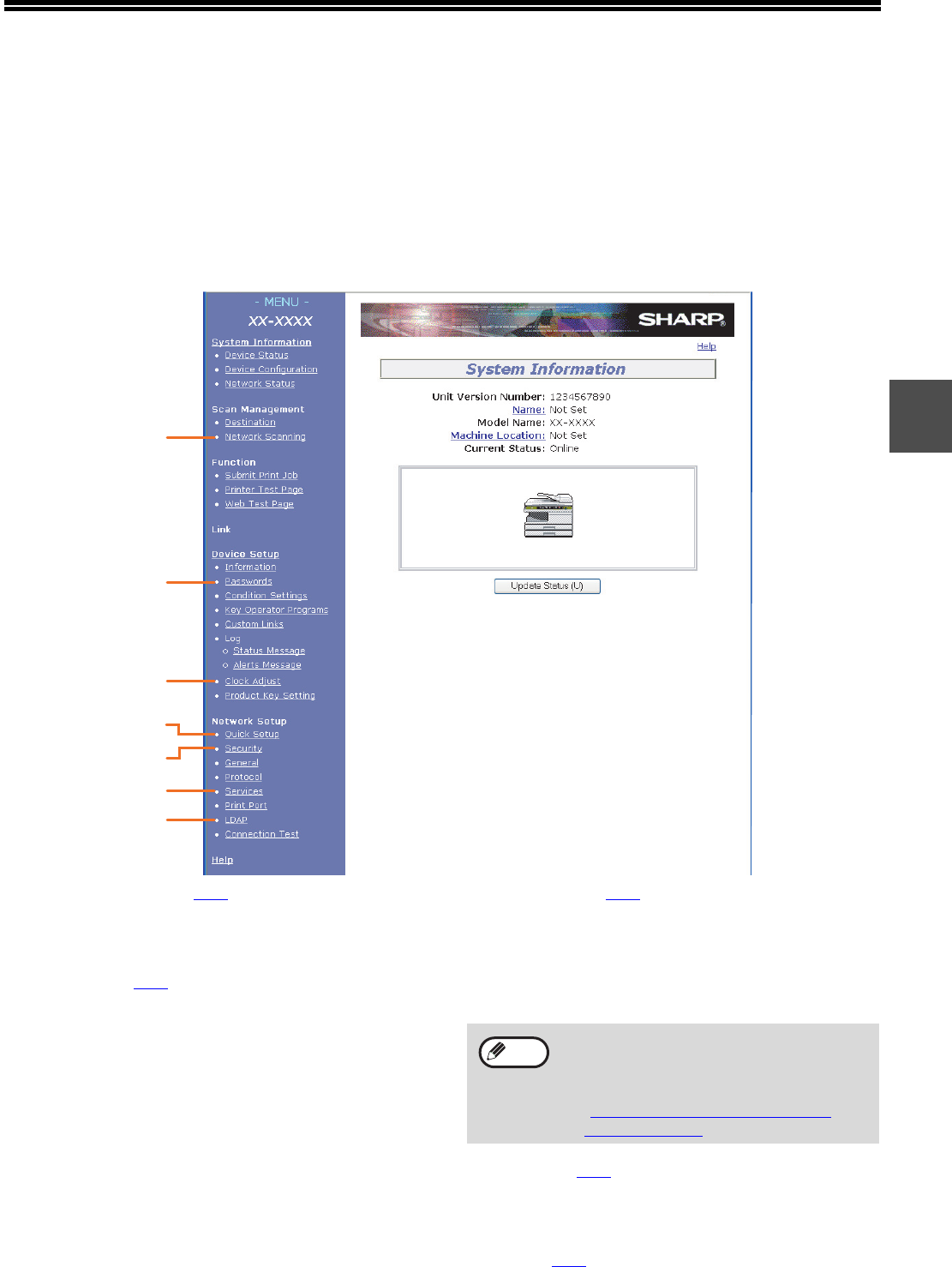
In addition to the menu that appear in the user Web page, the Web page for the administrator also shows menus
that can only be established by the administrator.
A menu frame appears on the left side of the page. When you click an item in the menu, a screen appears in the
right frame that allows you to configure settings for that item.
Settings that can only be configured by the administrator are explained here.
(1) Network Scanning (p.14
)
This lets you select transmission methods for the
network scanner function and configure settings
for Scan to E-mail.
(2) Passwords (p.16
)
The administrator can establish passwords to
protect the Web site. Enter the password that you
wish to establish and click the [Submit] button.
A password can be set for the administrator and
users.
(3) Clock Adjust
This is used to set the time in the machine. Make
sure the time is set correctly when performing
Scan to E-mail.
This setting does not appear on models that have
the fax function. If your model has the fax function,
see the "Operation manual (for facsimile)" to set
the time at the operation panel of the machine.
(4) Quick Setup (p.15
)
This is used to configure basic settings for the
SMTP, DNS, and LDAP servers.
(5) Security
Port numbers can be changed or disabled for
security purposes.
(6) Services (p.15
)
This is used to configure advanced SMTP and
DNS server settings as needed for each
transmission method.
(7) LDAP (p.15
)
This is used to configure advanced settings for
global address searches.
(3)
(6)
(7)
(2)
(1)
(4)
(5)
If "HTTP" is disabled, it will not be possible
to open the Web page. To open the Web
page in this case, the network expansion kit
must be reset.
"HOW TO RESET THE NETWORK
EXPANSION KIT" (p.24)
Note
Vista de página 12
1 2 ... 8 9 10 11 12 13 14 15 16 17 18 ... 29 30

Comentários a estes Manuais

Sem comentários

Atec Narda-NBM-520 manuály

Uživatelské manuály a uživatelské příručky pro Zařízení Atec Narda-NBM-520.
Poskytujeme 1 manuály pdf Atec Narda-NBM-520 ke stažení zdarma podle typů dokumentů: Uživatelský manuál


Další produkty a příručky pro Zařízení Atec

Modely Typ Dokumentu
Narda-EF1891 Uživatelský manuál   Atec Narda-EF1891 User Manual, 2 stránky
Narda-EFA300 Uživatelský manuál   Atec Narda-EFA300 User Manual, 7 stránky
Narda-8800 Series Uživatelský manuál   Atec Narda-8800 Series User Manual, 6 stránky
Narda-Nardalert-S3 Uživatelský manuál   Atec Narda-Nardalert-S3 User Manual, 6 stránky
Narda-EHP-50D Uživatelský manuál   Atec Narda-EHP-50D User Manual, 12 stránky
Lindgren-HI-1801 Uživatelský manuál   Atec Lindgren-HI-1801 User Manual [fr] , 1 stránky
Narda-8700-8741d-8754D-8760D-8761D Uživatelský manuál   Atec Narda-8700-8741d-8754D-8760D-8761D User Manual, 7 stránky
Narda-EA5091-EB5091-EC5091-ED5091 Uživatelský manuál   Atec Narda-EA5091-EB5091-EC5091-ED5091 User Manual, 3 stránky
Narda-EMR-20C-21C Uživatelský manuál   Atec Narda-EMR-20C-21C User Manual, 3 stránky
Narda-A8860-A8862-A8864 Uživatelský manuál   Atec Narda-A8860-A8862-A8864 User Manual [en] , 6 stránky
Narda-EHP-200 Uživatelský manuál   Atec Narda-EHP-200 User Manual, 3 stránky
Narda-EHP-50C Uživatelský manuál   Atec Narda-EHP-50C User Manual, 4 stránky
JDSU-MTS-5800 Uživatelský manuál   Atec JDSU-MTS-5800 User Manual [fr] , 4 stránky
Narda-SRM-3006 Uživatelský manuál   Atec Narda-SRM-3006 User Manual, 16 stránky
EXFO-FTB-200 Uživatelský manuál   Atec EXFO-FTB-200 User Manual, 10 stránky
EXFO-FTB-400 Uživatelský manuál   Atec EXFO-FTB-400 User Manual, 12 stránky
EXFO-FTB-200-V2 Uživatelský manuál   Atec EXFO-FTB-200-V2 User Manual, 8 stránky
MultiWave-Smart-Aligner Uživatelský manuál   Atec MultiWave-Smart-Aligner User Manual, 2 stránky
R-S-CBT_CBT32 Uživatelský manuál   Atec R-S-CBT_CBT32 User Manual, 12 stránky
JDSU-JD788A Uživatelský manuál   Atec JDSU-JD788A User Manual, 16 stránky