Sharp AR-5320 Guia de Configuração Página 10

  • Descarregar
  • Adicionar aos meus manuais
  • Imprimir
Vista de página 9
8
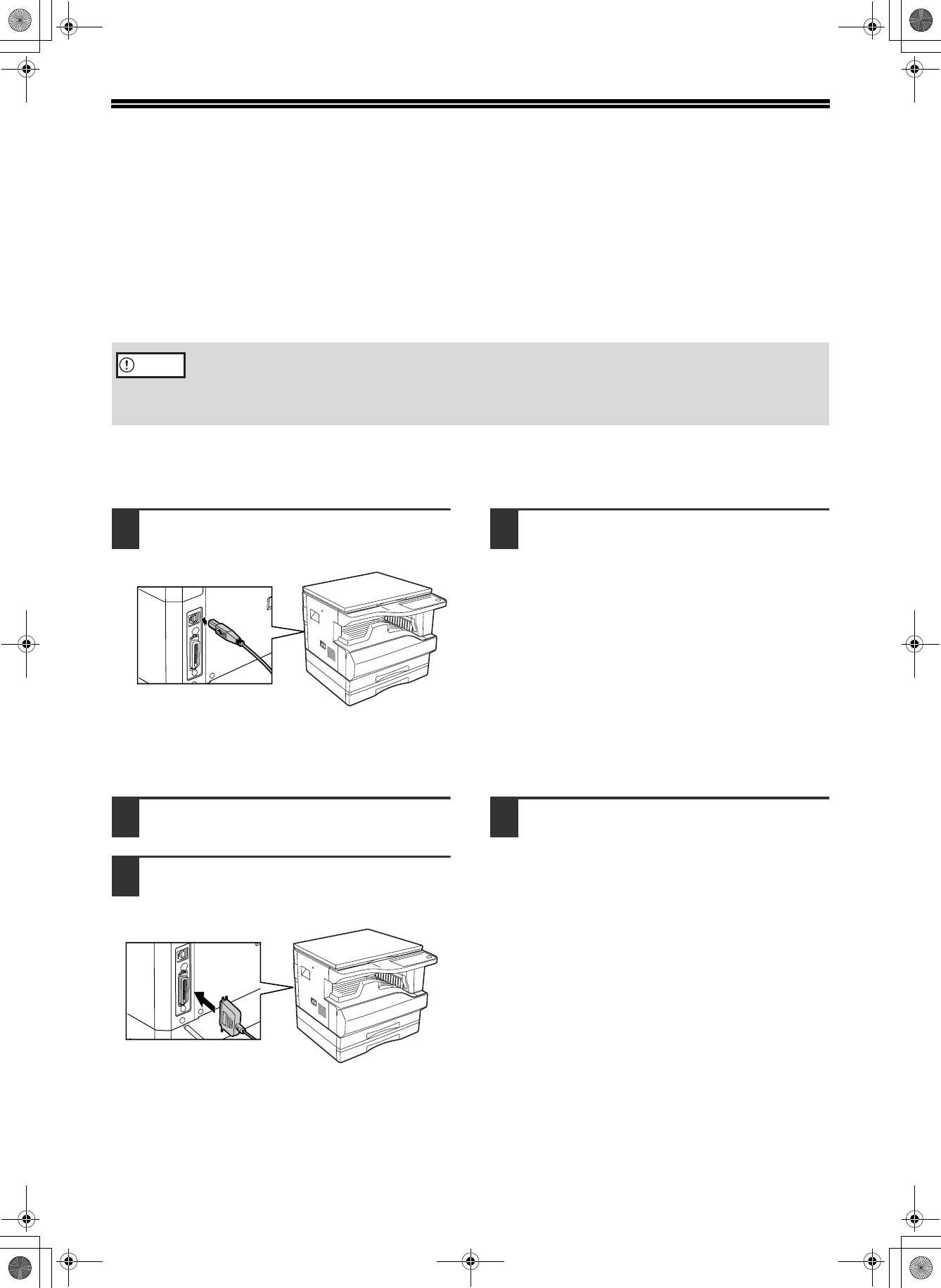
CONNECTING TO A COMPUTER
Follow the procedure below to connect the machine to your computer.
Interface cables for connecting the machine to your computer are not included with the machine. Please purchase
the appropriate cable for your computer.
Interface cable
USB cable
Shielded twisted pair cable, high-speed transmission equivalent (3 m (10 feet) max.)
Parallel cable
IEEE 1284-Shielded type bi-directional parallel interface cable (3 m (10 feet) max.)
CONNECTING A USB CABLE
1
Insert the cable into the USB
connector on the machine.
2
Insert the other end of the cable into
the your computer's USB connector.
CONNECTING A PARALLEL CABLE
1
Ensure that your computer and the
machine are turned off.
2
Plug the cable into the parallel
connector on the machine, and fasten
with the clasps.
3
Plug the other end of the cable into
your computer's parallel connector.
• USB is available with a PC/AT compatible computer that was originally equipped with USB and had Windows
98, Windows Me, Windows 2000 Professional, Windows XP Professional or Windows XP Home Edition
preinstalled.
• Do not connect the interface cable before installing the printer driver. The interface cable should be connected
during installation of the printer driver.
Caution
!install_ar5316_5320.book 8 ページ 2003年12月2日 火曜日 午前9時42分
Vista de página 9
1 2 ... 5 6 7 8 9 10 11 12 13 14 15 16

Comentários a estes Manuais

Sem comentários

Advidia Kamery ochrony podręczniki użytkownika

Zaczynanie od A

Kliknij na poniższy alfabet, aby przejść do pełnej listy modeli zaczynających się od tej litery

Modele Rodzaj dokumentu
A-200
Instrukcja Użytkownika   5.5.20 Release Notes New Features, 19 strony
Instrukcja Użytkownika   A-200 Speed Dome, 11 strony
Instrukcja Użytkownika   A&E SPECIFICATION, 5 strony
A-46
Instrukcja Użytkownika   Table of Contents - Video Insight, Inc., 23 strony
"A" Series
Instrukcja Instalacji   advidia "A" Series Installation manual, 13 strony
Instrukcja Użytkownika   advidia "A" Series User manual [en] , 112 strony
Instrukcja Użytkownika   advidia "A" Series User`s manual, 101 strony