Sharp CD-ES777 Instruções de Operação Página 23
- Página / 36
- Índice
- RESOLUÇÃO DE PROBLEMAS
- MARCADORES

- CD-ES777 1
- SPECIAL NOTES 2
- IMPORTANT SAFETY INSTRUCTIONS 3
- Important Instruction 4
- Contents 5
- Precautions 6
- Controls and indicators 7
- AC INPUT 8
- General Information 9
- System connections 10
- Preparation for Use 11
- Remote control 13
- General control 14
- Basic Operation 15
- Listening to a CD (CDs) 16
- CD Playback 17
- Advanced CD playback 18
- Listening to the radio 21
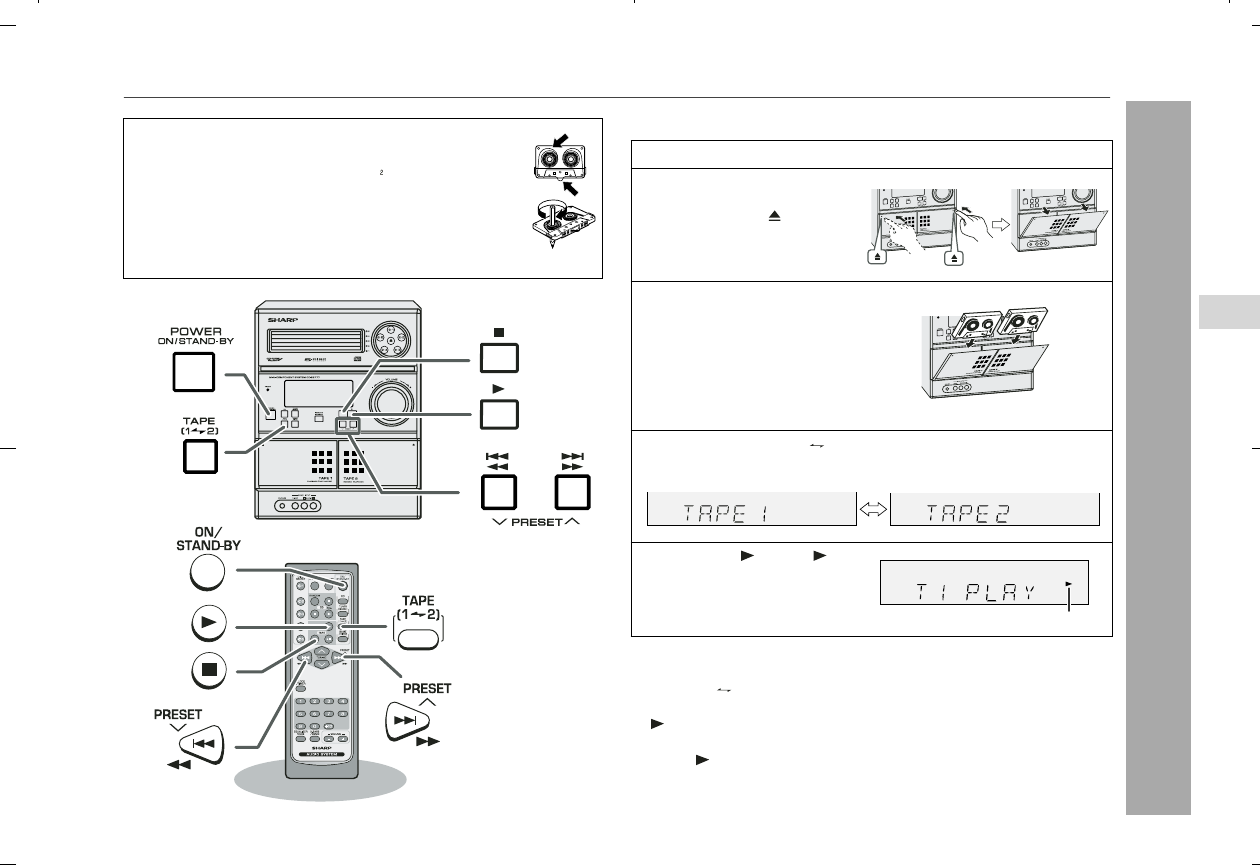
- Tape Playback 23
- Recording on a cassette tape 24
- Tape Recording 25
- Advanced Features 27
- Enhancing your system 31
- Troubleshooting chart 32
- References 33
- Maintenance 34
- Specifications 35
- CONSUMER LIMITED WARRANTY 36
© 2020, manymanuals-pt.com. Todos os direitos reservados. | 0.035 s |
 Manymanuals.com
 Manymanuals.de
 Manymanuals.fr
 Manymanuals.it
 Manymanuals.pl
 Manymanuals.cz
 Manymanuals.es
 Manymanuals-pt.com
Comentários a estes Manuais