Sharp CE-AG06 Manual do Utilizador
Consulte online ou descarregue Manual do Utilizador para Acessórios para câmaras fotográficas/vídeo Sharp CE-AG06. SL-5500 Operation Manual for Camera Manual do Utilizador
- Página / 7
- Índice
- MARCADORES

Resumo do Conteúdo
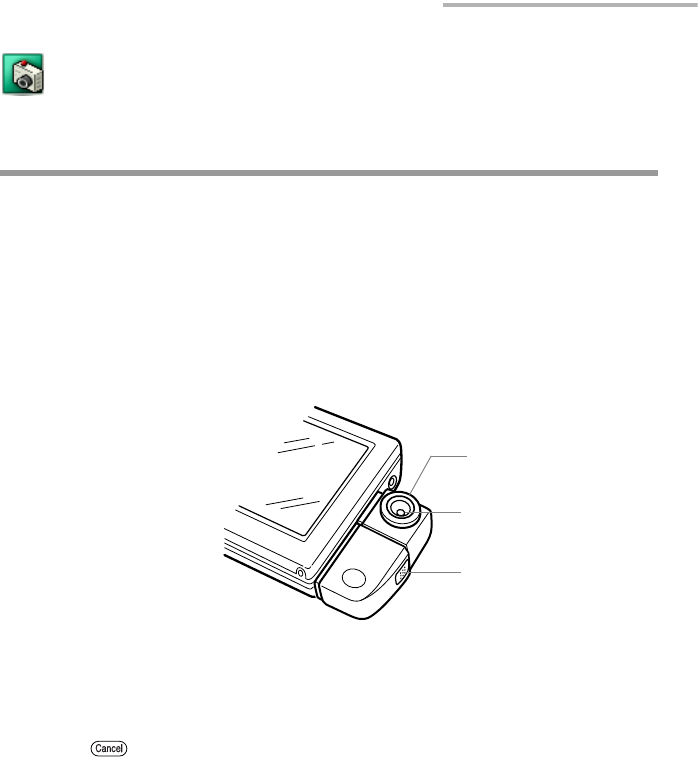
Camera (optionally available) 1 Camera (optionally available)The Camera application allows you to take a photo using the specified digital camera card
2 Camera (optionally available)Make sure that the label on the card “SHARP CE-AG06 DIGITAL CAMERA CARD” is facing up when you insert it.Caution:• Be s
Camera (optionally available) 3Caution:• When removing the card, hold the camera on the center part and pull it out. Holding and pulling out the camer
4 Camera (optionally available)Setting up the shooting preferencesOverview Fullscreen button Displays the image on the full screen. The Fullscreen mo
Camera (optionally available) 5Taking photos1.Turn the unit on and pull out the stylus.2.Remove the Display protection cover.3.Attach the Digital Came
6 Camera (optionally available)Note:• The images you shoot will be saved in jpeg format.• The Remain indicator displays the approximate number because
SHARP CORPORATION
© 2020, manymanuals-pt.com. Todos os direitos reservados. | 0.026 s |
 Manymanuals.com
 Manymanuals.de
 Manymanuals.fr
 Manymanuals.it
 Manymanuals.pl
 Manymanuals.cz
 Manymanuals.es
 Manymanuals-pt.com
Comentários a estes Manuais