Sharp VL-NZ10S Especificações Página 91
- Página / 111
- Índice
- MARCADORES

- BRUKSANVISNING 1
- OPERATION MANUAL 1
- Quick Operation Guide 4
- To stop playback 6
- Volume Control 6
- Lock button 7
- Image file name 7
- Supplied Accessories 8
- Optional Accessories 9
- Precautions 10
- Dew Formation 11
- CLEANING 12
- CLEANINGNOW 12
- Contents 13
- Digital Still Camera 15
- Features 15
- Operation References 16
- Quick Reference List 19
- On-screen Display Index 20
- CARD-CAMERA mode 21
- CARD-VCR mode 21
- PROTECT. TAB 22
- TAPE END 22
- MEMORY CARD 23
- Preparation 24
- Attaching the Battery Pack 25
- Removing the Battery Pack 25
- Powering the Camcorder 26
- Inserting a Cassette 27
- Removing a Cassette 27
- Removing a Card 28
- Inserting a Card 28
- Installing the Memory Battery 29
- Removing the lithium battery 29
- Setting the Language 30
- Changing the Language 30
- AREA PARIS 31
- Attaching the Lens Hood 32
- Attaching the Straps 32
- Using the Lens Cap 33
- Tips on Recording 33
- Positions 33
- Basic Operations 34
- To pause recording 35
- To turn the power off 35
- Auto Focus 36
- Macro Shots 36
- Remaining Recording Time 37
- Remaining Battery Power 37
- Current Tape Position 39
- Watching Playback on a TV 40
- Useful Features 41
- DGTL ZOOM 43
- Useful features 44
- Camera Recording 44
- Mounting the Zoom Microphone 44
- ZOOM MI C 45
- Gamma Brightness 46
- Compensation 46
- To obtain a brighter picture 47
- QK. RETURN 48
- Using Fade Mode 49
- To use Fade Out only 49
- PHOTO SNAP STILL 50
- Using Still Recording 51
- To return to normal screen 52
- Self Recording 53
- 4 Begin recording 53
- TAPE SPEED 54
- AUD IO MODE 55
- Tape Playback Functions 58
- 1 During playback in TAPE-VCR 58
- 2 Press the h (or j) button 58
- AUD I OAUDIO 59
- Playback 60
- Gamma Playback 61
- ULTI FRAME 62
- PB EFFECT 64
- PIC. EFFECT 65
- Advanced Features 66
- SCENE MENU 67
- To return to Auto Focus mode 69
- HITE BAL 70
- EXPOSURE 71
- Recommended Shutter Speeds 73
- To stop editing 75
- To stop recording 76
- Audio Dubbing Feature 77
- 12-bit audio recording 77
- 16-bit audio recording 77
- Audio Dubbing 78
- Using the Software 81
- Opening the PDF Manual 81
- Printing the PDF Manual 81
- Digital Still Camera Features 82
- REC MODE 83
- Card Recording 84
- Deleting One Stored Image 88
- Deleting All Stored Images 89
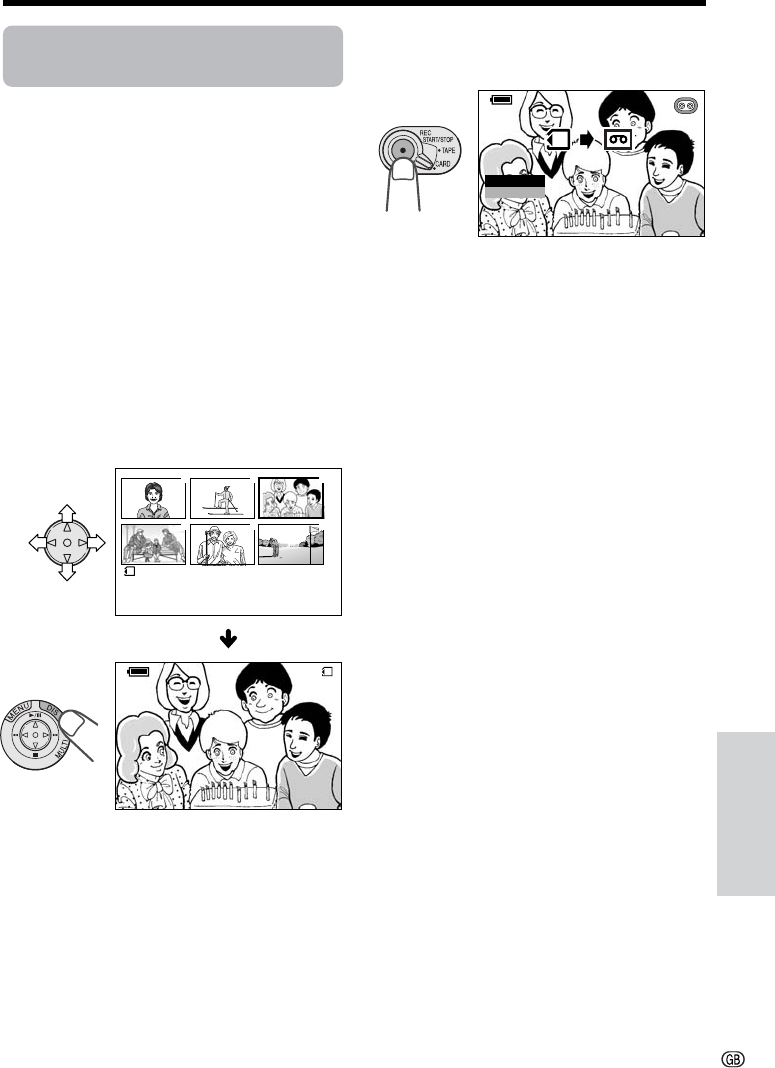
- Available mode: 91
- CARD-VCR 91
- About DPOF 92
- • The M indicator disappears 93
- Transferring Data on Card 94
- LCD BRI GHT 95
- LCD COLOUR 95
- 1 LONDON 96
- Area Table 97
- SUMR TIME 98
- Useful Information 100
- DV Technology 101
- SD Memory Card and 101
- MultiMediaCard 101
- Copyright Protection (VL-NZ10 102
- Appendix 102
- Mini DV Cassette 102
- SD Memory Card 104
- AC Adapter/Battery Charger 104
- Battery Pack 104
- Extending battery pack life 105
- Cleaning 106
- Using Your Camcorder Abroad 106
- DEMO MOD E 107
- Before Requesting Service 108
- Specifications 110
- SHARP CORPORATION 111
Manuais e produtos relacionados com Câmaras de vídeo Sharp VL-NZ10S
 (92 páginas)
(116 páginas)
(112 páginas)
(58 páginas)
(139 páginas)
(97 páginas)
(148 páginas)
(117 páginas)
(14 páginas)
(124 páginas)
(96 páginas)
(72 páginas)
(136 páginas)
(120 páginas)
(92 páginas)
(116 páginas)
(112 páginas)
(58 páginas)
(139 páginas)
(97 páginas)
(148 páginas)
(117 páginas)
(14 páginas)
(124 páginas)
(96 páginas)
(72 páginas)
(136 páginas)
(120 páginas)
 (63 páginas) (112 páginas)
© 2020, manymanuals-pt.com. Todos os direitos reservados. | 0.017 s |
 Manymanuals.com
 Manymanuals.de
 Manymanuals.fr
 Manymanuals.it
 Manymanuals.pl
 Manymanuals.cz
 Manymanuals.es
 Manymanuals-pt.com
Comentários a estes Manuais